Task automation explained: what it is and how it works


Task automation is the use of technology to execute repetitive, rule-based tasks with minimal human involvement, freeing professionals to spend their time on work that actually requires thinking. At its core, task automation covers everything from data entry and email responses to report generation and appointment scheduling. It sits at the foundation of broader categories like Business Process Automation (BPA) and Robotic Process Automation (RPA), but its starting point is always the same: a single, repeatable task that a person currently does by hand.
Here is what task automation typically handles:
The appeal is straightforward. Every minute a professional spends on a task a computer could handle is a minute not spent on strategy, client relationships, or problem-solving. Automation closes that gap.
Table of Contents
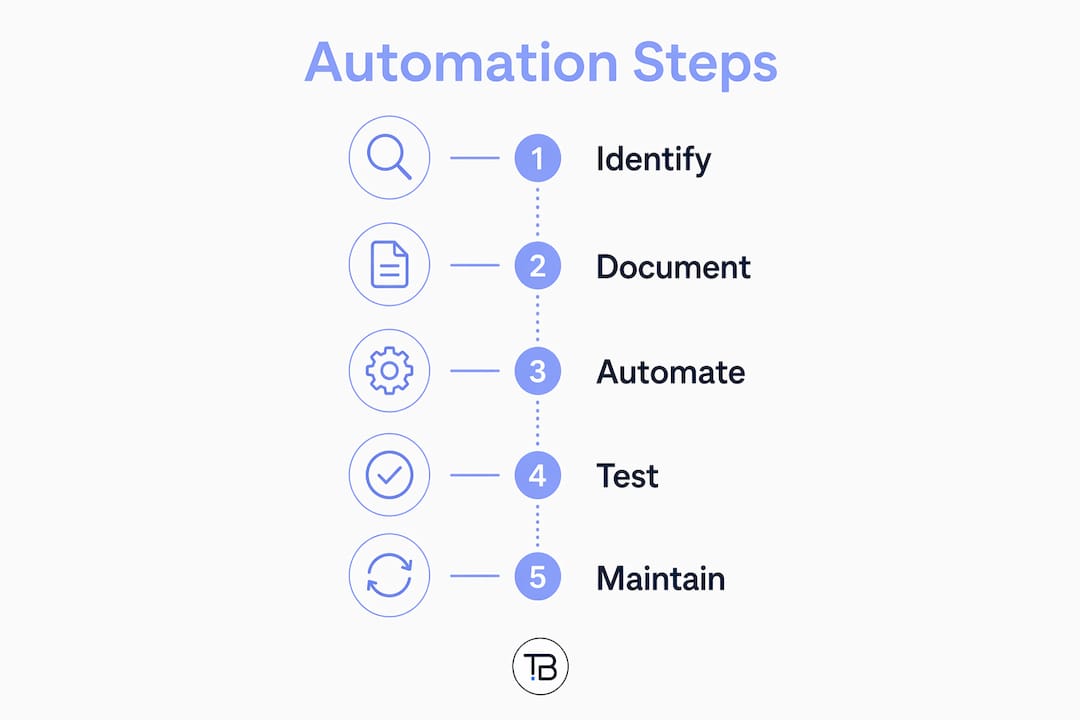
How to automate tasks effectively: a practical framework
Getting automation right takes more preparation than most people expect. Picking a tool and pointing it at a broken process just speeds up the errors. These steps give you a foundation that holds.
Pro Tip: Before you automate anything, spend 30 minutes writing down every exception and edge case in the manual process. Those edge cases are exactly where automations break, and catching them on paper is far cheaper than catching them in production.
What are the real benefits of task automation?
The productivity gains from automation are real, but the less obvious benefits are often what make it stick long-term.
The combination of these benefits is why business process automation has moved from a nice-to-have to a standard operating expectation across industries.

Common examples of task automation in professional settings
Task automation shows up across every professional function. The examples below span marketing, administration, customer service, and HR, and they represent the kinds of tasks that are genuinely worth automating first.
For small businesses especially, office automation applied to even two or three of these areas can reclaim several hours per week per employee.

How does task automation differ from process automation and RPA?
These three terms get used interchangeably, but they describe different scopes of work.
Task automation targets a single, discrete action within a workflow. Sending a confirmation email, updating a record, or generating a file are all task-level actions. The scope is narrow by design. Task automation is the foundational element within broader automation initiatives, handling the individual building blocks that larger systems are built from.
Workflow or process automation coordinates a sequence of those tasks to complete an end-to-end process. Think of an order-to-cash workflow: a customer places an order, the system checks inventory, generates a pick list, sends a shipping notification, creates an invoice, and updates the ledger. Each step might be a simple automated task, but the orchestration of all of them together is process automation.
Robotic Process Automation (RPA) goes further still. RPA tools interact with software interfaces the way a human would, clicking buttons, reading screens, and entering data across multiple systems that were never designed to talk to each other. It is particularly useful when there is no API available and the only integration point is the user interface itself.
The practical distinction matters when you are choosing what to build. A single repetitive action calls for task automation. A multi-step workflow across one or two connected systems calls for process automation. A complex, multi-department process spanning legacy systems with no integration layer is where RPA earns its place.
How AI is changing what task automation can do
Traditional task automation works on fixed rules: if this happens, do that. It is reliable and fast, but it cannot adapt. AI changes that equation.
AI-powered automation can analyse patterns in your data, identify where a workflow is slowing down, and adjust routing or priorities in real time. Instead of waiting for a human to notice that invoices from a particular vendor always get flagged incorrectly, an AI-enhanced system detects the pattern and corrects it automatically.
AI-enhanced automation shifts the focus from executing tasks mechanically to dynamically improving workflows and preventing issues before they surface. The practical result is that businesses can scale the complexity of their automated processes without needing to hire proportionally more people to manage them.
Anomaly detection is one of the clearest examples. A rule-based system flags every transaction above a set threshold. An AI system learns what “normal” looks like for your specific business and flags only the genuinely unusual ones, dramatically reducing false positives. Predictive scheduling is another: rather than sending reminders at fixed intervals, an AI-driven tool learns when a particular client is most likely to respond and times the outreach accordingly.
For professionals considering where to start, the role of AI in administrative tasks is a practical entry point. The tools are more accessible than they were even two years ago, and the learning curve has dropped considerably.
Overcoming the real barriers to adopting task automation
The biggest obstacle to automation is rarely technical. It is psychological.
Fear of losing control is the most common reason professionals delay automation. The concern is understandable: handing a task to a system feels like giving up oversight. But automation anxiety among Canadians tends to ease quickly once people see that a well-built automation is more consistent and less error-prone than the manual alternative. The key is starting with low-stakes tasks where the cost of a mistake is minimal.
A second barrier is what practitioners call “maintenance debt.” Automations are not set-and-forget systems. API changes, software updates, and shifts in your data structure can all cause an automation to fail silently, producing wrong outputs without anyone noticing. Scheduling a quarterly audit of your active automations, where you verify each one is still running correctly and producing the expected results, prevents small failures from becoming large problems.
The human-in-the-loop approach is worth revisiting here too. During the first few weeks of any new automation, build in a review step where a person checks the output before it is acted on. Once you have confirmed the automation handles edge cases correctly, you can remove the checkpoint. This staged approach builds trust in the system without exposing the business to unnecessary risk.
Finally, if you are not sure whether your business is ready to automate, a 2026 automation readiness guide can help you identify the clearest signals that the time is right.
Pro Tip: Run a “failure mode” exercise before launching any automation: write down three ways it could go wrong and what the impact would be. If any failure mode is catastrophic, add a human review step. If all three are recoverable, you are probably safe to run it unattended.
Tech Business Development makes automation practical for small businesses
Knowing what task automation is and actually implementing it well are two different things. Most small businesses have the motivation but not the time to build, test, and maintain automated workflows on top of everything else they are managing.

Tech Business Development specialises in exactly this gap. Their workflow automation service handles the full build: mapping your existing processes, identifying the highest-value automation opportunities, setting up the tools, and testing everything before it goes live. Clients in marketing, logistics, and professional services have significantly reduced their operational costs through tailored automation setups, without needing to hire a dedicated operations team. Beyond automation, Tech Business Development also covers Google Services setup (GMB, GA4, GTM, AdWords), SEO, and website development, so the efficiency gains extend across your entire digital operation. If you are ready to stop doing by hand what a system could handle for you, explore their services or visit Tech Business Development to get started.
Key takeaways
Task automation delivers the most value when it is built on documented, standardised processes and maintained with regular audits rather than treated as a one-time setup.
PointDetailsStart with documented processesMap your manual workflow before automating; flawed processes produce flawed automations.Match tool to task complexitySimple trigger-action tasks need lightweight tools; multi-system workflows need more capable platforms.Use human review checkpointsA human-in-the-loop approval step during early adoption reduces risk on high-stakes tasks.Audit automations regularlyAPI changes and software updates can cause silent failures; quarterly checks keep automations reliable.Tech Business DevelopmentOffers end-to-end workflow automation setup for small businesses, with reported significant cost reductions.