Welcome in 5 Minutes: No Code Client Onboarding for Small Agencies


The single automation worth building first fires the moment a contract is signed or a payment clears: a branded welcome email, an intake form, and a scheduling link, all sent within minutes with zero manual work. That one trigger eliminates the awkward “dead time” that makes new clients doubt they made the right call. Set it up today using whatever e-signature or CRM tool you already have.
TL;DR:
- Automate sending a branded welcome email, intake form, and scheduling link immediately after contract signing or payment, within five minutes.
- Map each onboarding step carefully to identify owners, triggers, and timings, then set clear goals for reducing kick-off time, improving form completion, and shortening payment delays.
- Prioritize automations like welcome emails, intake forms, signed document confirmations, and reminders, while avoiding full automation of scope negotiations or personalized client conversations.
- Use contract signature or payment confirmation as the primary trigger, and validate essential client information before automating internal tasks to avoid delays or errors.
- Test workflows thoroughly, ensure native integrations, and leave human oversight for complex or judgment-based steps to maintain compliance and client trust.
Table of Contents
- How to map your client onboarding process before you automate it
- Which onboarding tasks are safe to automate first?
- What’s the exact sequence to build in a no-code tool?
- How do you choose the right onboarding tools?
- How should you roll out and measure onboarding automation?
- Proof points from Tech Business Development’s onboarding work
- Three quick wins and two mistakes to avoid
- How Tech Business Development gets you there faster
- Sources
How to map your client onboarding process before you automate it
Automating a broken process just breaks it faster. Before touching any software, map what actually happens between “client says yes” and “project kicks off.” Grab a whiteboard or a shared doc and list four things for every step: the trigger that starts it, whether the client sees it, who inside your business owns it, and how long it should take.
Most agencies discover their onboarding has more owners than steps. One person sends contracts, another chases payment, a third builds the project folder, and nobody agrees on whose job it is to send the welcome email. That confusion is exactly what automation platforms address.
Once mapped, set goals before picking tools:
- Reduce time-to-kickoff. Measure the days between signed contract and first working session. Most agencies can cut this from about a week to a couple of days with basic automation.
- Raise intake completion rate. If clients abandon your forms halfway through, automation won’t fix a form that’s too long. Fix the form first.
- Shorten payment lag. If invoices sit unpaid for two weeks, an automated reminder sequence usually recovers most of that time.
- Maintain compliance. Any step involving identity verification, sanctions screening, or financial disclosure needs a human checkpoint, not a shortcut. The U.S. Department of the Treasury’s OFAC screening guidance exists precisely because automated systems that skip verification create real legal exposure.
The decision rule that keeps you out of trouble: automate anything repeatable and predictable, and keep anything requiring judgment, negotiation, or empathy in human hands. A welcome email is predictable. A scope conversation about why the client’s budget doesn’t match their expectations is not.
Which onboarding tasks are safe to automate first?
Not every task deserves the same automation priority. Some are obvious, low-risk wins. Others need more scaffolding before you hand them to a workflow tool, and a few should never be fully automated regardless of how good your stack gets.
Low-risk automations to build immediately:
- A branded welcome email that fires within five minutes of contract signature, including a Calendly (or similar) booking link for the kickoff call.
- An intake form that collects the exact information your team needs, with conditional logic so clients only see questions relevant to their service tier.
- Automatic confirmation when an e-signature completes, logged and time-stamped without anyone checking manually.
- A payment link embedded directly in the welcome sequence rather than sent as a separate follow-up.
- File upload fields with basic validation (file type, size, required documents) so incomplete submissions get flagged before they reach your team.
- Reminder sequences for unsigned contracts, unpaid invoices, or incomplete intake forms, spaced two or three days apart.
Medium-risk automations worth adding once the basics run cleanly:
- Workspace provisioning: automatically creating a shared folder, project board, or client portal.
- Access grants tied to service tier, so a $500 project and a $15,000 retainer don’t get identical permissions.
- Automated brief generation, where an AI assistant drafts a one-page kickoff summary from intake responses for internal use.
What should never be fully automated: the actual kickoff conversation, scope negotiation when a client’s needs don’t match the signed agreement, and anything that requires reading between the lines of what a client actually wants. Automation software can prep the meeting. It can’t run it.
Pro Tip: Build the AI brief-generation step so it produces an internal document only, never something sent directly to the client. Human review before anything client-facing prevents the awkward moment where an AI misreads a nuance in the intake form and repeats it back to the person who wrote it.

What’s the exact sequence to build in a no-code tool?
Start with the trigger, because everything downstream depends on it. You have three realistic options, and each has a real tradeoff.
E-signature completion (DocuSign, PandaDoc) fires the instant a contract is signed, which is the earliest possible moment to start onboarding. The tradeoff: it fires before payment, so you risk provisioning a workspace for a client who never pays the deposit.
CRM “closed won” status gives you more control since a human updates the status only when they’re confident the deal is real. The tradeoff: it depends on someone remembering to update the CRM, which adds a manual step back into a process you’re trying to remove manual steps from.
Payment confirmation is the most conservative trigger. Nothing happens until money moves. The tradeoff: clients wait longer for their welcome sequence, which can feel cold immediately after signing.
Most agencies land on contract signature as the primary trigger, with a parallel payment-confirmation check that gates only the highest-friction steps, like workspace access. LowCode Agency’s onboarding workflow guide documents a five-phase sequence built around exactly this approach, moving from client notification straight through to automatic kickoff scheduling.
Here’s the sequence worth building, step by step:
- Trigger fires on contract signature or payment confirmation.
- Validate the data. Check that the client’s name, email, and service tier fields aren’t blank before anything downstream runs.
- Send the branded welcome email with the intake form and Calendly link embedded, not linked from a separate message.
- Create the project in your PM tool (Asana, ClickUp, Monday) using a template that matches the service tier.
- Notify your team in Slack or by email with a summary card: client name, tier, contract value, and a link to the new project.
- Route for approval if the deal exceeds a threshold you set, running this in parallel with the client-facing steps rather than blocking them.
- Client books the kickoff through the Calendly link, which triggers a confirmation and a reminder 24 hours out.
Branch the workflow by service tier early. A $2,000 project and a $20,000 retainer shouldn’t get the same nine-field intake form or the same project template. Set approval thresholds so only deals above a certain value need a manager’s sign-off, and run that approval step in parallel with the welcome sequence, not before it. Sequential approval is the single most common cause of onboarding automation feeling slower than the manual process it replaced.
Before rolling out to real clients, run through this testing checklist:
- Dry-run the entire sequence using an internal test contact.
- Confirm every merge field populates correctly. A welcome email that says “Hi {{first_name}}” to a real client kills trust instantly.
- Test webhook retries by intentionally disconnecting your integration mid-sequence.
- Turn on error logging and set up an alert (Slack or email) so a failed step gets caught within the hour, not discovered by an annoyed client.
- Have a rollback plan: know exactly how to revert to manual onboarding if the automation breaks on a live client.
SoloClientStack’s practitioner walkthrough describes this same watch-validate-branch-notify pattern using Make or Zapier, with a second scenario dedicated purely to converting intake answers into an internal kickoff brief.
How do you choose the right onboarding tools?
Your stack needs to do six things reliably: fire triggers without dropping events, collect intake data including file uploads, handle e-signatures, take payments, create records in your PM or CRM tool, and log everything with an audit trail you can check when something goes wrong.
Selection criteria that actually matter, in order:
- Native integrations between your CRM, payment processor, and PM tool. Every extra middleware layer is another point of failure.
- Security certifications where relevant. If you handle payment data, PCI compliance isn’t optional. If you’re storing client business data, ask whether the vendor carries SOC 2.
- Pricing that scales with volume, not per-user fees that punish you for adding a project manager to review approvals.
- Admin simplicity. If only one person on your team understands the workflow builder, you have a single point of failure disguised as a feature.
- Templates and support quality, especially for the e-signature and form-builder pieces, since these change more often than your CRM setup does.
Integrate in this order: CRM and payment processor first, because those two systems generate the triggers everything else depends on. Then connect project management and team notifications, since that’s where the internal handoff happens. AI-assisted brief generation and document storage come last. They’re valuable, but they’re optimizations on top of a working pipeline, not the pipeline itself.
Tech Business Development’s guide on CRM workflow automations breaks down ten specific event-to-action mappings that make this integration order concrete rather than theoretical.
How should you roll out and measure onboarding automation?
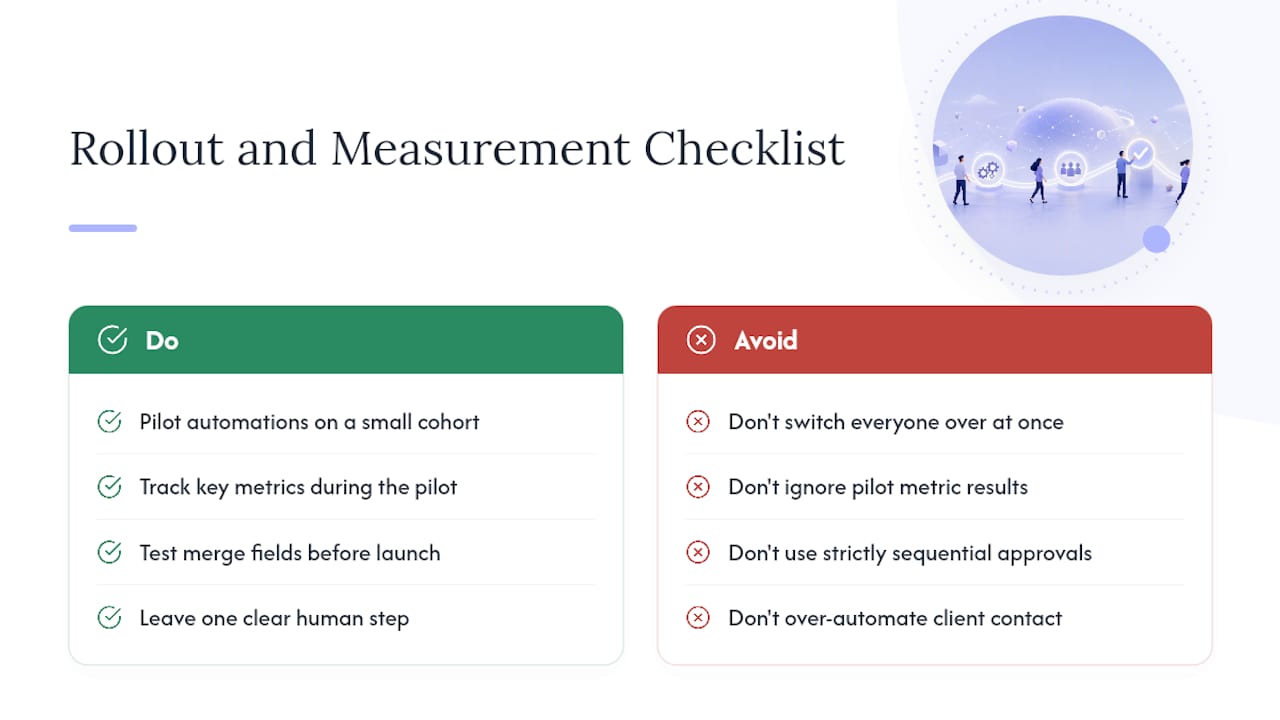
Pilot before you commit. Run the new automation on a small portion of new onboardings, such as a single service tier, for a few weeks before switching everyone over. This staged approach, recommended in SoloClientStack’s onboarding guide, catches errors while the cost of a mistake is still small.
Track key metrics during the pilot, such as intake form completion, time from signature to kickoff, payment collection time, client satisfaction via surveys, and automation error rates that require manual intervention.
Automation done well cuts administrative overhead sharply. SHRM’s research on automated benefits administration found that automating paperwork, reminders, and structured tasks lowers administrative costs while improving consistency, a pattern that holds just as well for client onboarding as it does for HR processes.
The most common failure modes are mundane. Missing merge fields send broken emails. Permission errors block a client from accessing a folder that doesn’t exist yet. Sequential approval routing creates the exact delay you built the automation to remove. And occasionally, agencies over-automate: a client who wanted one human conversation gets five automated touchpoints before anyone actually talks to them. Fix each with the obvious remedy. Test merge fields before launch, provision access in parallel with notification, route approvals concurrently, and always leave one clearly human step in the sequence, even if it’s just a personal note after the automated welcome.
Proof points from Tech Business Development’s onboarding work
Tech Business Development builds these exact workflows for small businesses and agencies across marketing, logistics, and technology, and the pattern holds regardless of sector: automation that handles the repeatable steps frees teams to spend their time on the parts of client work that actually need a person. Clients typically see manual task volume and operational overhead drop substantially once welcome sequences, intake, and project setup stop depending on someone remembering to do them.
What we share with clients starting this process:
- An automation blueprint mapping trigger to kickoff, adaptable to whatever CRM or PM tool you already run.
- A Notion template for tracking onboarding KPIs during a pilot.
- The testing checklist used before any workflow goes live with real clients.
- A one-page kickoff brief prompt structure for teams experimenting with AI-assisted prep, drawn from our lead capture automation work.
Three quick wins and two mistakes to avoid
Build these three first: a welcome email firing within five minutes of signature, a ten-question intake form (not thirty), and a direct Calendly link for kickoff booking. Each takes under a day to set up and delivers most of the client-experience benefit.
Avoid two mistakes. First, never automate identity or payment verification without proper security controls, especially anything touching sanctions screening. Second, don’t strip out human contact too early. A signature and a form aren’t a relationship. Before building anything, audit which of your current steps genuinely need a person, and protect those from automation, not just from neglect.
— Shayan Shirvani
How Tech Business Development gets you there faster
There’s a real gap between reading a workflow diagram and having it actually running against your CRM by Friday. The gap is closed by building tailored automation, wiring up integrations between your existing tools, and training your team to run it, instead of leaving you to debug webhook retries alone at 11 p.m.

This fits small agencies and local service businesses that want a done-for-you setup rather than another software subscription to configure themselves. The service handles CRM connections, intake forms, e-signature triggers, and project creation logic as one connected system, tuned to how your business actually takes on new clients. If you’re ready to see what that looks like for your specific onboarding flow, check out available automation services and book a short discovery call to map your first workflow.
Sources