CRM data migration: a practical checklist for teams


A successful CRM data migration follows a short, repeatable sequence: scope, audit, clean, map, test, cut over, hypercare. The one rule you cannot skip is testing the import before go-live on a sample big enough to catch mapping errors and small enough to fix fast. This step-by-step migration flow treats the test import as mandatory, not optional, and the SMB teams who follow it consistently avoid the two failures that sink most projects: unassigned leads and broken record associations.
Run through this before you export a single row:
- Define scope: which objects, how much history, what gets left behind.
- Audit source data for duplicates, missing fields, and inconsistent picklists.
- Clean and normalise records so import doesn’t inherit years of mess.
- Map fields and pick a unique ID strategy for deduplication.
- Test import a sample batch and validate it against a checklist.
- Cut over on a read-only source, then run the full import plus delta.
- Hypercare for about one to two weeks with daily checks on owners and errors.
Pro Tip: *A typical SMB migration with clean data and standard objects runs a few weeks.
Key Takeaways
A CRM data migration succeeds when scope is locked before export, a test import is treated as mandatory, and hypercare runs as active daily work for at least a week.
| Point | Details |
|---|---|
| Test import is non-negotiable | Never move to full import until two consecutive test batches validate clean. |
| Import order prevents broken links | Load users, then companies, then contacts, then deals, then activities, then attachments. |
| Hypercare needs daily owners | Assign one person per daily check for the first 7 to 14 days after cutover. |
| Rollback plans come before cutover | Preserve original exports and set error-rate thresholds before you start, not after. |
| Managed migration reduces risk | Tech Business Development assigns a migration owner and documents mappings for teams that need a low-risk cutover. |
Table of Contents
- Deciding scope, owners, and timeline before you export
- The 8-step CRM migration flow from export to hypercare
- What usually breaks, and how to recover fast
- Choosing the right migration tool for the job
- Hypercare targets that actually protect trust
- DIY or managed migration: how to actually decide
- How Tech Business Development handles the risk points that break migrations
- Frequently asked questions about CRM data migration
- Sources
Deciding scope, owners, and timeline before you export
Every migration that goes sideways skipped this part. Teams jump straight to exporting CSVs before anyone has agreed on what “done” looks like, and that’s how you end up mapping fields for data nobody wanted moved in the first place.
Start with a scope checklist:
- Which objects move: contacts, companies, deals, tickets, custom objects?
- How much history: last 3 to 6 months of activity, or the full 12 to 24 months?
- What gets excluded: dead leads, closed-lost deals older than a year, spam entries?
- Who approves each decision: use a lightweight RACI so nobody argues about scope mid-project.
Three common scope choices, each with a trade-off. Minimal scope moves contacts and open deals only, fast but leaves historical reporting behind. Practical scope brings 3 to 6 months of activity, enough for reps to trust the new system without dragging in years of stale notes. Full-history scope migrates 12 to 24 months, which preserves reporting continuity but multiplies your cleanup and testing workload.
HubSpot’s migration guidance treats this as a change management exercise, not a data dump. Migrations fail when scope gets underestimated, cleansing gets skipped, or go-live gets rushed without a rollback plan.
Assign three roles before export day: a migration owner who makes final calls, a data steward who owns cleaning and mapping accuracy, and a support channel where reps report problems during hypercare. Pro Tip: Put the migration owner’s name on the RACI chart, not just their title. Ambiguity about who signs off on go-live is the single most common reason cutovers slip a week.
The 8-step CRM migration flow from export to hypercare
This is the sequence. Skip a step and you’ll pay for it during hypercare, usually at 4 p.m. on a Friday when a sales rep discovers their pipeline is empty.
- Export every source object as clean CSV or via API, including custom fields and attachments.
- Audit for duplicates, orphaned records, and fields with inconsistent formatting.
- Clean and normalise picklists, date formats, and phone number patterns so the destination CRM doesn’t reject rows.
- Define an ID strategy, usually email for contacts and a composite key (company name plus domain) for accounts, so you can dedupe reliably.
- Map fields between source and destination, documenting every transformation rule in a shared sheet.
- Test import a representative batch and validate against your checklist.
- Run the full import, then a delta import to catch anything created after your export.
- Cut over and enter hypercare, watching the new system daily for the first one to two weeks.
Import order matters more than most teams expect, because child records need their parents to exist first or associations break silently.
| Import order | Object | Why it goes here |
|---|---|---|
| 1 | Users and owners | Every other record needs a valid owner to assign to. |
| 2 | Companies and accounts | Contacts and deals link to these; import them first. |
| 3 | Contacts | Depends on companies existing; carries the primary ID for dedupe. |
| 4 | Deals and opportunities | Depends on contacts and companies for association. |
| 5 | Activities and tasks | Depends on deals and contacts for context. |
| 6 | Attachments and files | Imported last, linked to whichever record they belong to. |
Get this order wrong and you’ll see deals with no linked contact, or tasks pointing at records that don’t exist yet. Microsoft’s own guidance on migrating into Dataverse stresses exactly this: schema and lookup relationships need to exist before dependent records land, or the platform will either reject the import or silently drop the association.
Running the test import properly
Pull 100 to 500 records for your test batch, enough to include every record type and edge case (a contact with no company, a deal with a missing close date, a company name with special characters). Random sampling is fine, but deliberately include the weird records, because those are the ones that break mappings.
After the test batch lands, validate against this checklist:
- Do owners match what they were in the source system?
- Are contact-to-company and contact-to-deal associations intact?
- Do required fields have values, or did nulls slip through?
- Did picklist values map correctly, or did “Closed Won” become “closed_won”?
- Do dashboards and reports pull the test records correctly?
- Do existing automations or workflows fire the way they should on the new records?
Any failure here goes into a remediation loop: fix the mapping rule, re-run the test batch, validate again. Don’t move to full import until two consecutive test batches come back clean.
Pro Tip: Notes and email threads are the quiet killers of CRM migrations. Export notes with their created date, author, and parent record ID intact, and for email history, reconnect directly to the mail provider rather than trying to migrate thread bodies out of the old CRM. Thread exports almost always lose formatting and attachments.
Cutover day
Cutover is the moment the source system goes read-only. Lock it down, run your final delta import to catch anything created since the last full import, and send a short communication to every team affected: “As of [date/time], enter new records in [new CRM] only.” Set explicit rollback triggers before you start, not after something breaks. If error rates exceed your threshold, or a critical object fails validation, you pause and roll back rather than pushing through and hoping hypercare fixes it. Immediately after cutover, check that logins work, that the top 10 reps can see their assigned records, and that at least one live deal moves through its stages correctly.
What usually breaks, and how to recover fast
The same handful of problems show up in almost every migration. Missing owners top the list, usually because a user mapping table had a typo or a rep left the company between audit and cutover. Broken associations come next: a contact that no longer links to its deal, usually from importing objects out of order. Duplicate surges happen when your ID strategy wasn’t strict enough and the same contact landed twice under slightly different email capitalisation. Invalid dates trip up imports when the source and destination use different date formats. Automations misfiring is the sneaky one: a workflow built for the old field names starts firing incorrectly against new data it was never designed to see.
Run these checks in the first 24 to 72 hours:
- Pull a report of unassigned leads. It should read zero.
- Compare dashboard totals between old and new systems for obvious divergence.
- Review the import error log line by line, not just the summary count.
If something’s broken, your rollback plan needs three things ready before cutover: your original exports preserved untouched, a clear set of cutover criteria that define what “good enough to proceed” looks like, and a delta re-import strategy for pulling in just the records created since your last clean import. Full rollback should be a last resort, triggered only when error rates or association failures pass a pre-agreed threshold, not a knee-jerk reaction to the first support ticket.
- Isolate the affected object or record set.
- Attempt a targeted re-import for just that segment.
- If targeted fixes don’t resolve it within a set window, escalate to full rollback using your preserved exports.
Choosing the right migration tool for the job
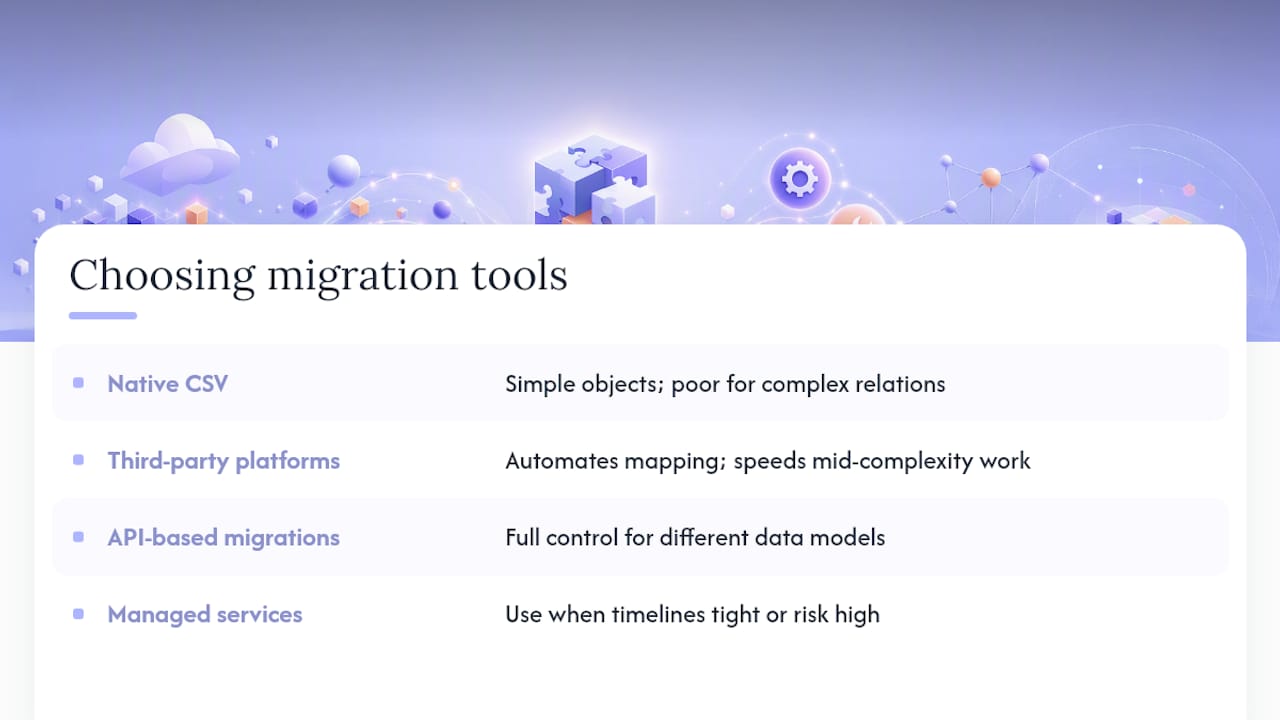
Four tool categories cover almost every migration. Native CSV import tools, built into most CRMs, handle simple objects well but struggle with complex associations and large volumes. Third-party migration platforms like SyncMatters automate field mapping and object sequencing across popular CRM pairs, which speeds up mid-complexity projects. API-based custom migrations give you full control over transformation logic, ideal when you’re moving between platforms with genuinely different data models, such as HubSpot, Salesforce, Zoho CRM, or Microsoft Dataverse. Managed migration services hand the whole process to a team that’s done it before, which matters most when timelines are tight or the risk of getting it wrong is high.
Bring in a partner when data volume climbs past a few thousand records with complex relationships, when you’re juggling many integrations that all need to survive the switch, or when your internal team has weeks, not months, to hit a hard cutover date. Vet any partner or tool against a short list: can they show you the rollback plan before you sign, will they document every field mapping in writing, and can they point to a comparable migration they’ve actually run?
Pro Tip: Ask any migration partner one blunt question: “What happens if the test import fails twice?” A partner with a real process has a documented answer. One without a process starts improvising.
Hypercare targets that actually protect trust
Hypercare is where migrations quietly succeed or quietly fall apart. The step-by-step SMB migration process sets concrete hypercare metrics rather than vague “monitor closely” advice: zero unassigned leads and zero deals missing an owner on day zero, fewer than 10% of records missing a Next Step Date by day 14, dropping under 5% by day 30, and an import error rate that trends toward zero within the first week.
Run a daily checklist for the first 7 to 14 days: check unassigned leads each morning, review the previous day’s error log, spot-check five random records for association integrity, and confirm dashboards match expected totals. Assign one owner to each check, not a rotating cast, so accountability doesn’t slip. A migration owner who treats hypercare as active daily work rather than a passive monitoring period catches problems in hours instead of weeks. Set a response SLA for critical issues too: a broken association affecting live deals should get a fix or a targeted re-import within 24 hours, not queued for next sprint.

DIY or managed migration: how to actually decide
DIY makes sense with a small dataset, standard objects, and someone on staff comfortable with APIs and field mapping. It stops making sense fast once you’re juggling custom objects, a dozen integrations, or a board-mandated cutover date that leaves no room for a failed test import.
Managed migration usually wins when revenue operations are on the line and a stalled pipeline costs real money every day it’s broken. A sensible middle path: run a small pilot in-house to learn your own data’s quirks, then contract out the full migration once you know exactly what you’re asking for.
How Tech Business Development handles the risk points that break migrations
Most failed migrations trace back to the same three gaps: no dedicated owner, no documented mapping, and no real test import before go-live. Tech Business Development runs migrations as a managed engagement built around exactly those gaps, with a named migration owner, written mapping documentation your team can review before anything moves, and secure export and delta processes that catch new records created mid-project.
What you get in a typical engagement:
- A migration owner assigned to your project from kickoff through hypercare.
- Full mapping documentation so field-level decisions are visible and reviewable.
- A secure export and delta import process that protects sensitive customer records throughout.
- Daily hypercare reporting for 14 days after cutover, tracking owners, errors, and associations.
- Rollback support if a test batch or the full import surfaces a problem worth pausing for.
If your migration involves multiple integrations or a tight cutover window, this is the difference between a smooth transition and a support queue full of “where did my deal go” tickets. Getting started is simple: reach out through the services page for a scoped quote, and the team will walk your data volume and object complexity into a realistic timeline before you commit to anything.
Frequently asked questions about CRM data migration
How long does a CRM data migration usually take? A straightforward SMB migration with clean data and standard objects runs 2 to 4 weeks. Complex custom objects, multiple integrations, or full-history moves stretch that to 6 to 8 weeks or more.
What’s the biggest cause of CRM migration failure? Skipping the test import. Teams that jump from field mapping straight to a full import miss mapping errors that only surface once real data hits the destination system.
Do I need to migrate every field and every record? No. Most teams get better results with a practical scope: active contacts, open deals, and 3 to 6 months of recent activity, rather than dragging in years of stale history that nobody will use for reporting.
How do I connect a website to a new CRM after migration? Reconnect forms and lead capture tools directly to the new CRM through its native integration or API rather than routing through the old system. For WordPress sites, this typically means reinstalling or reconfiguring the CRM’s official plugin and re-testing form submissions end to end.
What does hypercare actually involve day to day? Daily checks on unassigned leads, error logs, and a handful of spot-checked records for association integrity, run by one assigned owner for the first one to two weeks after cutover.
Sources
- CRM Data Migration: Step-by-Step Process for SMBs
- CRM data migration to Dataverse: Key insights and best practices
- 5 Simple CRM Data Migration Methods
Always check your specific destination platform’s documentation for field limits, import order, and dedupe rules before running a large batch.
Recommended