WordPress vs Wix: which to pick for your Canadian small business


Choose Wix if you want a polished site live this week with no technical overhead. Choose WordPress if you expect growth, need deep SEO control, or plan to own your data long-term. That one sentence covers roughly 80% of decisions. The table and bullets below handle the rest.
| Dimension | Wix | WordPress.org |
|---|---|---|
| Ease of use | Drag-and-drop, no hosting setup | Requires hosting, theme, and plugin choices |
| Customisation ceiling | High for visual design, limited for complex logic | Near-unlimited with code or plugins |
| Cost predictability | Bundled, predictable billing | Unbundled; hosting + plugins + dev time vary |
| Data ownership | Platform lock-in; no full export | Full database and media export at any time |
Quick next steps based on your situation:
- Brochure site or local service business: Start a free Wix trial today. You can publish without touching a line of code.
- Small store with growth plans: Set up WordPress.org with a managed Canadian host (SiteGround, Kinsta, or WP Engine) and install WooCommerce.
- Content hub, publisher, or complex integrations: Go WordPress from day one. The plugin ecosystem and data portability will save you a costly rebuild later.
Table of Contents
- How do Wix and WordPress actually differ?
- Is Wix or WordPress easier to set up and maintain?
- What can you actually control in design and templates?
- Which platform gives you more plugins and integrations?
- Ecommerce: Wix Stores versus WooCommerce
- Which platform gives you better SEO control?
- How does page speed compare between the two?
- Who is responsible for security and maintenance?
- What does it actually cost for a Canadian buyer?
- Which platform scales with your business?
- Can you move your site away from Wix or WordPress later?
- How to choose: a short checklist before you decide
- When should you hire a managed partner instead of going DIY?
- Key takeaways
- Your site, built and managed without the technical overhead
How do Wix and WordPress actually differ?
The structural gap between these two platforms drives every other trade-off in this comparison.
Wix is a managed SaaS product. You pay a subscription, and Wix handles hosting, security patches, backups, and infrastructure. You get a polished editor and a curated app marketplace. What you give up is control: you cannot access the server, export your full site, or install arbitrary third-party software. Experts frame this as a trade-off between capacity and simplicity: Wix trades a ceiling on certain complex capabilities for a simpler, lower-maintenance model.
WordPress.org is open-source software you install on a hosting account you control. The software itself is free. You choose your host, your theme, your plugins, and your update schedule. WordPress.com sits in between: it is a hosted service built on WordPress software, with plans ranging from free (very limited) to business tiers that allow plugins. For most serious sites, WordPress.org on your own host is what people mean when they say “WordPress.”
The practical consequences of that structural difference:
- Hosting: — Wix includes it; WordPress.org requires a separate hosting account.
Pro Tip: If no one in your organization will own ongoing maintenance, that single fact should push you toward Wix. A neglected WordPress site is a security liability. A neglected Wix site is just a stale one.
Is Wix or WordPress easier to set up and maintain?
Wix wins on setup speed, and it is not particularly close.
A simple five-page brochure site on Wix can go from blank to published in a few hours, including choosing a template, writing copy, and connecting a custom domain. You do not pick a host, configure DNS beyond pointing your domain, or install anything. Wix is consistently recommended for small businesses and local service providers who prioritise ease of use precisely because it removes those infrastructure decisions.
WordPress setup takes longer, even with a one-click installer from a managed host. You still need to choose a theme, install and configure essential plugins (Yoast SEO or Rank Math, a caching plugin, a security plugin, a backup plugin), and test the result. Budget a full day for a beginner setting up a simple site, and a week or more for a small store.
Realistic time estimates by site type:
- Five-page brochure site: — Wix, 3–6 hours; WordPress, 1–2 days including plugin configuration.
Ongoing maintenance tells a different story. Wix requires almost none from you: the platform handles it. WordPress requires a monthly maintenance routine: core updates, plugin updates, a backup check, and a security scan. That is roughly 1–2 hours per month for a simple site, more for a complex one.
Pro Tip: Before committing to WordPress, spin up a free trial on a managed WordPress host for 14 days and actually build something. If the plugin and theme decisions feel paralyzing, Wix is the right call for your situation.
What can you actually control in design and templates?
Wix gives you pixel-level visual control through its drag-and-drop editor. You can place any element anywhere on the canvas. That freedom is genuinely useful for landing pages and portfolio sites where exact visual placement matters. The trade-off is that Wix templates are not interchangeable once you have built on one: switching templates means rebuilding your content layout from scratch.
Wix is strong for getting a polished site live quickly with minimal infrastructure work, and its template library reflects that: most designs look professional out of the box with minimal adjustment. Wix also introduced its AI site builder, which generates a layout from a short description, useful for getting a starting point fast.
WordPress uses a theme system. The block editor (Gutenberg) and page builders like Elementor give you structured control: you work within a grid and block system rather than free-form placement. That structure is actually an advantage for responsive design, because blocks reflow predictably on mobile. Full code access means a developer can build virtually anything, but that requires budget.
Design tasks that are straightforward on Wix:
- Moving a button two centimetres to the left without touching CSS
- Swapping a hero image across the whole site in one click
- Animating a section entrance without a plugin
Design tasks that typically need a developer on WordPress:
- Custom post type layouts that fall outside the default theme grid
- Complex conditional display logic (show this section only to logged-in users)
- Deep WooCommerce template overrides for a custom product page
Pro Tip: Always preview a template on mobile before committing to it. On Wix, check the mobile editor separately, because mobile layouts are edited independently and do not always mirror desktop changes automatically.
Which platform gives you more plugins and integrations?
WordPress has tens of thousands of plugins while Wix offers a curated app marketplace that is smaller by comparison. That gap matters most when you need a specialised integration: a specific CRM connector, a custom membership workflow, or an industry-specific booking system.
For common integrations, both platforms cover the basics well:
- Analytics: — Google Analytics 4 installs on both; WordPress gives you more control over the data layer via Google Tag Manager.
Where Wix shows its limits is in specialised or enterprise-grade integrations. If you need a specific payment gateway that Wix does not support, you are stuck. On WordPress, you can usually find a plugin or build a custom integration via the REST API.
Plugin conflicts are a real risk on WordPress. Installing two plugins that modify the same WordPress function can break your site. That risk is manageable with a staging environment and a disciplined update process, but it is a genuine maintenance overhead that Wix users never face.
Wix’s app marketplace does enforce compatibility standards, which means the apps you install are less likely to conflict. The cost is a smaller selection and, occasionally, a missing tool that your workflow requires.
Ecommerce: Wix Stores versus WooCommerce
For a simple Canadian store with under 100 products and standard shipping rules, Wix Stores is genuinely competitive. You can launch, connect Stripe or PayPal, configure Canadian tax rates, and start selling within a day or two. The checkout experience is clean, and Wix handles the hosting and SSL automatically.
WordPress + WooCommerce is more flexible and scalable but requires setup and maintenance. WooCommerce is free to install, but the extensions that handle subscriptions, advanced shipping rules, or complex product configurations add cost quickly. A realistic WooCommerce setup for a growing Canadian store includes the core plugin, a payment gateway extension (Stripe for WooCommerce is free; others vary), a shipping plugin configured for Canada Post or Purolator, and a tax plugin like TaxJar or Avalara for multi-province compliance.
Practical ecommerce scenarios:
- Enterprise or high-volume store: — WordPress + WooCommerce, or a dedicated platform. Wix is not designed for this scale.
Canadian merchants should note that both platforms support Stripe, which handles CAD transactions and deposits directly to Canadian bank accounts. Wix Payments is available in Canada as well, though its fee structure should be compared against Stripe before committing.
Statistic to know: Refact’s sampled testing found Wix passing a strong majority of Core Web Vitals by default, which matters for ecommerce because page speed directly affects conversion rates.
Which platform gives you better SEO control?
Both platforms cover the basics: editable title tags, meta descriptions, sitemaps, and canonical tags. For a local Canadian service business targeting one city, Wix’s built-in SEO tools are sufficient. You can set up your Google Business Profile, add structured data for local businesses, and manage redirects through the Wix dashboard.
WordPress is the preferred standard for sites that need granular SEO control, and the gap shows up in three specific areas:
- Custom structured data: — WordPress with a plugin like Schema Pro or Rank Math lets you add highly specific schema markup (FAQ, HowTo, Product, LocalBusiness) with full control. Wix supports some schema types but not all, and custom JSON-LD injection is limited.
For Canadian businesses targeting competitive national keywords or running content-heavy sites, WordPress’s technical SEO depth pays off. Regional hosting considerations matter too: a Canadian host (or a CDN with Canadian edge nodes like Cloudflare) reduces latency for Canadian visitors regardless of platform.
Feature checklist:
How does page speed compare between the two?
Wix delivers predictable baseline performance because the vendor manages the infrastructure. Refact’s sampled tests found Wix passing 70–75% of Core Web Vitals by default, without any optimization work from the site owner. That is a meaningful baseline for a small business that will not invest time in performance tuning.
WordPress performance varies enormously. A poorly configured WordPress site on shared hosting with an unoptimized theme and 40 plugins can score worse than a default Wix install. A well-tuned WordPress site on a managed host like Kinsta or WP Engine, with a lightweight theme, proper caching (WP Rocket or W3 Total Cache), and image optimization (ShortPixel or Imagify), can outperform Wix by a meaningful margin.
Performance tips that apply to both platforms:
- Compress and resize images before uploading. WebP format reduces file size significantly.
- Use a CDN. Cloudflare’s free tier works on both platforms and adds Canadian edge nodes.
- Audit with Google Lighthouse or PageSpeed Insights before launch, not after.
- Limit third-party scripts (chat widgets, tracking pixels) to what you actually use.
The practical implication: if you are not going to invest time in performance optimization, Wix’s managed baseline is the safer bet. If you are willing to configure a WordPress host properly, you can build a faster site.
Who is responsible for security and maintenance?
This is where the platforms diverge most sharply in terms of risk.
Wix handles hosting security, SSL certificates, DDoS protection, and platform updates centrally. You do not patch anything. If Wix’s infrastructure has a problem, Wix fixes it. Your exposure is limited to your own account security (use a strong password and two-factor authentication) and the content you publish.
WordPress security is your responsibility, or your host’s, or both. Most WordPress vulnerabilities trace to outdated third-party plugins rather than the core software. Discipline is the key variable: a well-maintained WordPress site with auto-updates enabled, a security plugin like Wordfence or Sucuri, and regular backups is genuinely secure. A neglected one is not.
For practical CMS security, follow this maintenance schedule:
- Weekly: Check for plugin and theme updates; review security scan logs.
- Monthly: Run a full backup verification; review user accounts and permissions.
- Quarterly: Audit installed plugins and remove unused ones; test your restore process.
- Annually: Review your hosting plan and consider a security audit if the site handles sensitive data.
Pro Tip: Choose a managed WordPress host (Kinsta, WP Engine, or Pressable) rather than generic shared hosting. Managed hosts handle core updates, daily backups, and server-level security, which removes the biggest maintenance burden from your plate.
What does it actually cost for a Canadian buyer?
The core cost difference is bundled versus unbundled.
Wix bundles hosting, templates, and core features into paid plans that produce predictable costs but create platform lock-in. WordPress is free software, but costs arise from hosting, premium plugins, and maintenance. Neither is inherently cheaper; the right comparison is total cost of ownership over two to three years.
Typical Canadian cost ranges (approximate, in CAD):
| Item | Wix | WordPress.org |
|---|---|---|
| Platform / software | Included in plan | Free |
| Hosting (annual) | Included | — |
| Wix plan (annual) | $250–$500 | N/A |
| Premium plugins / apps | — | $100/year |
| Developer time (setup) | $500 (optional) | $500–$2,500 (recommended) |
Three-year total cost of ownership snapshots:
- Brochure site (five pages, no ecommerce): — Wix, approximately $750–$1,500 over three years. WordPress, approximately $900–$2,000 DIY, or $3,000–$5,000 with a developer setup and basic managed maintenance. This aligns with observed research indicating that typical small business Wix plans land in the $250–$500/year range once apps and renewals are considered. For a detailed breakdown of small business website costs in Canada, the variables that move the number most are developer time and premium plugin subscriptions.
Hidden costs to watch for:
Pro Tip: Budget for at least one developer review per year on a WordPress site. Catching a plugin conflict or a performance issue early costs far less than fixing a broken site after a bad update.
Which platform scales with your business?
The honest answer is that Wix scales well for most small Canadian businesses, and WordPress scales better for everything else.
| Site goal | Recommended platform | Rationale |
|---|---|---|
| Local service (plumber, salon, clinic) | Wix | Fast setup, low maintenance, sufficient SEO for local search |
| Portfolio or creative agency | Wix or WordPress | Wix for visual control; WordPress if the portfolio needs custom post types |
| Blog or content publisher | WordPress | Editorial workflow, category architecture, and SEO depth favour WordPress |
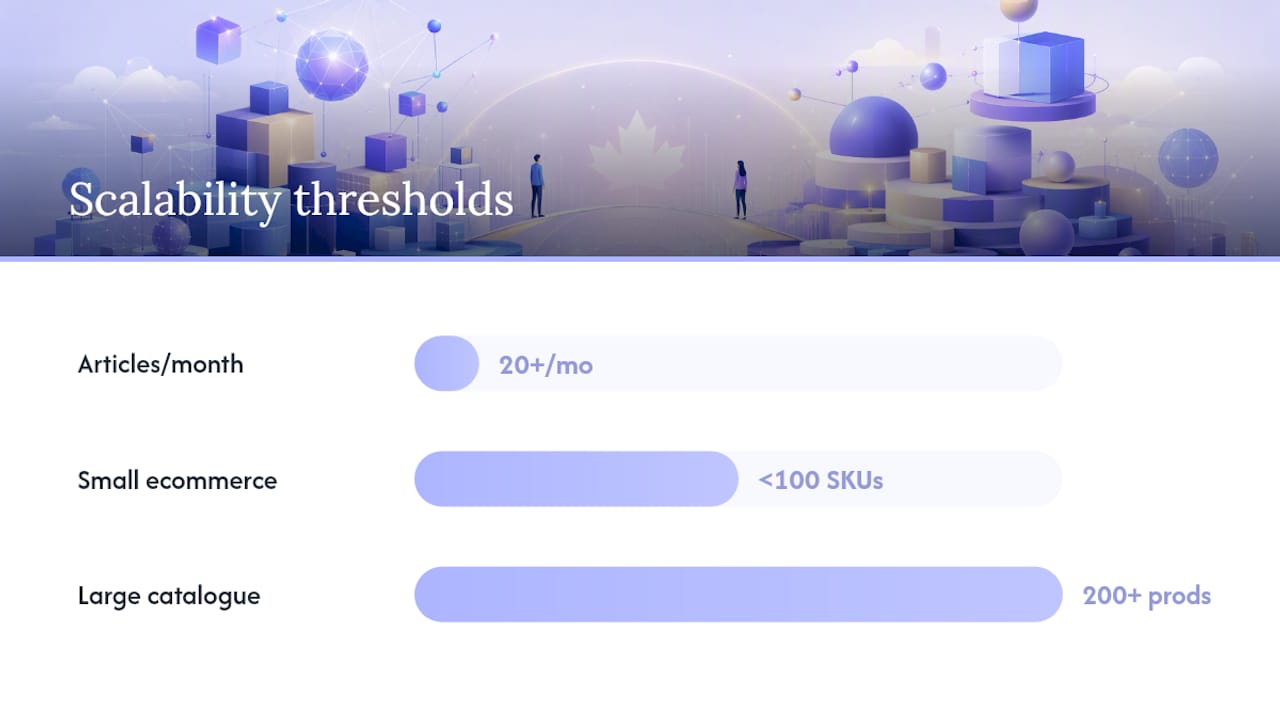
| Small ecommerce (under 100 SKUs) | Wix Stores | Simpler to launch and manage for straightforward catalogues |
| Growing ecommerce (100+ SKUs, complex rules) | WordPress + WooCommerce | Flexibility in pricing, shipping, and integrations |
| Membership or subscription site | WordPress | Plugin ecosystem (MemberPress, Restrict Content Pro) is far deeper |
| Multi-location or franchise site | WordPress | Custom post types, multi-site networks, and schema control are necessary |
Signals that should push you toward WordPress:
- You plan to publish more than 20 articles per month and need category and tag architecture.
- Your ecommerce catalogue will exceed 200 products or require complex pricing rules.
- You need custom API integrations with a CRM, ERP, or industry-specific software.
- You want to own your data and avoid a platform rebuild if you ever switch providers.
- SEO is a primary growth channel and you need full technical control.
For a deeper look at business scalability principles and how platform choice affects long-term growth, the structural decisions you make at launch tend to compound over time.
Can you move your site away from Wix or WordPress later?
This is the question most people do not ask until they need to, and the answer is asymmetric.
WordPress allows a full export of your database (all posts, pages, settings) and your media library. Moving from WordPress to another host, or to a different platform, is a standard technical task. Your content, your URLs, and your SEO history are portable.
Wix does not provide a full site export. You can export blog posts in a limited format, but your design, pages, and media are locked to the platform. Migrating away from Wix is effectively a rebuild from scratch on the new platform. That migration tax is real: budget $1,500–$5,000 CAD for a developer to rebuild a medium-complexity Wix site on WordPress, plus the time cost of recreating content and remapping URLs.
Migration checklist if you are moving from Wix to WordPress:
- Export all blog content using Wix’s blog export tool (RSS or XML format).
- Download all media files manually or via a third-party export tool.
- Map every old Wix URL to its new WordPress equivalent and set up 301 redirects.
- Recreate page layouts in WordPress using your chosen theme or page builder.
- Resubmit your sitemap to Google Search Console and monitor for crawl errors.
- Update any external links (social profiles, Google Business Profile, directories) to the new URLs.
Pro Tip: If there is any chance you will outgrow Wix within three years, start on WordPress. The cost of a proper WordPress setup upfront is almost always less than the cost of a Wix-to-WordPress migration later, especially once you factor in SEO recovery time.
How to choose: a short checklist before you decide
Pick Wix if you answer yes to most of these; pick WordPress if you answer yes to the bottom half.
Choose Wix when:
- You or your team has no web development experience and no budget for a developer.
- You need the site live within a week.
- Your site is a brochure, portfolio, or simple local service page.
- You have a small store with a straightforward catalogue and standard shipping.
- Predictable monthly costs matter more than long-term ownership.
- No one in your organization will own ongoing technical maintenance.
- You are not planning to scale significantly in the next three years.
Choose WordPress when:
- SEO is a primary growth channel and you need full technical control.
- You plan to publish content regularly and need a structured editorial workflow.
- Your ecommerce needs are complex: subscriptions, variable pricing, or large catalogues.
- You need custom integrations with CRMs, ERPs, or industry-specific tools.
- Data ownership and platform portability are non-negotiable for your business.
- You have access to a developer or a managed hosting partner.
Red flags that suggest hiring a managed partner instead of DIY:
- You have tried WordPress before and abandoned it due to maintenance complexity.
- Your site handles sensitive customer data (health, financial, or payment information).
- Downtime would directly cost you revenue (bookings, ecommerce, lead capture).
- You want WordPress’s capabilities but have no internal technical resource.
Questions to ask a developer or agency before outsourcing:
- What hosting environment do you use, and is it managed?
- How do you handle plugin updates and security patches?
- What does your backup and restore process look like?
- Do you provide staging environments for testing updates before they go live?
- What happens to my site and data if I stop working with you?
How we compared these platforms
This comparison draws on feature checklists verified against current Wix and WordPress.org documentation, cost modelling using Canadian hosting and plugin pricing as of 2026, and published performance research including Refact’s sampled Core Web Vitals data. Sample site types used for timing and cost estimates include a five-page brochure site, a small ecommerce store under 100 products, and a content site publishing weekly. Sources are listed in the useful sources section below. For platform-specific screenshots, API documentation, or current pricing, consult the official WordPress plugin directory and WordPress theme directory directly.
When should you hire a managed partner instead of going DIY?
The short answer: when you lack internal ownership, need custom integrations, or cannot tolerate downtime or security risk, a managed partner is the right call, not a fallback.
WordPress pays back its initial setup investment through long-term ownership and lower migration risk when growth or advanced SEO is expected. But that payback assumes someone is managing the platform. Without that, the investment erodes quickly.
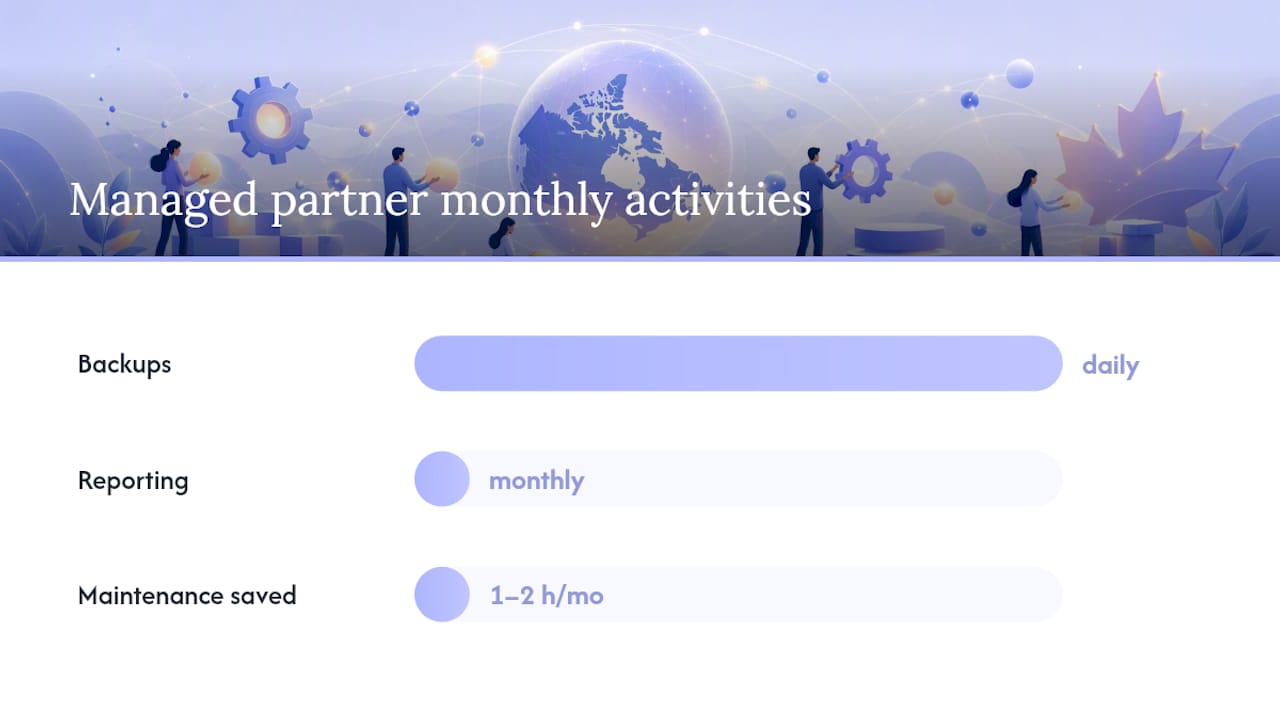
A managed website package from a qualified partner typically includes:
- Hosting on a managed WordPress environment with daily backups and server-level security
- Core, theme, and plugin updates applied and tested on a staging site before going live
- Performance monitoring and basic speed optimization (caching, image compression, CDN setup)
- SEO foundations: sitemap submission, Google Search Console setup, structured data for local businesses
- Analytics configuration: GA4, Google Tag Manager, and conversion tracking
- Monthly reporting on traffic, uptime, and site health
For Canadian small businesses, the value is concrete. A managed partner removes the 1–2 hours of monthly maintenance, eliminates the risk of a broken update taking your site offline during a busy period, and gives you a single point of contact when something goes wrong. Reducing IT operational costs through proper workflow management is a direct benefit of outsourcing platform maintenance to a specialist.
Tech Business Development builds and manages websites for Canadian small businesses, handling everything from hosting and security to SEO setup and analytics, so clients focus on running their business rather than maintaining their site.
Key takeaways
WordPress wins on control, ownership, and long-term SEO; Wix wins on speed, simplicity, and predictable costs for small Canadian businesses that have no internal technical resource.
| Point | Details |
|---|---|
| Platform type drives everything | Wix is managed SaaS; WordPress.org is self-hosted. That single difference explains every cost, control, and risk trade-off. |
| Wix suits low-maintenance sites | Local service pages, portfolios, and simple stores launch faster and stay stable without technical oversight. |
| WordPress suits growth and SEO | Full plugin ecosystem, data portability, and technical SEO depth make it the right foundation for content-driven or scaling businesses. |
| Migration from Wix is a rebuild | Wix has no full site export; switching platforms later costs $1,500–$5,000 CAD in developer time. Start on WordPress if growth is likely. |
| Tech Business Development manages both | For Canadian businesses that want WordPress capability without the maintenance burden, Tech Business Development provides managed builds with hosting, SEO, and analytics included. |
The real decision most guides miss
The WordPress vs Wix debate gets framed as a technical capability question, but the more useful frame is an ownership question. Who in your organization will own this site in 18 months?
If the honest answer is “nobody specific,” Wix is not a compromise. It is the correct choice. A Wix site that stays live, loads quickly, and gets updated with fresh content will outperform a WordPress site that nobody maintains, regardless of what the feature comparison says.
Where I think the conventional wisdom goes wrong is in treating WordPress as the aspirational choice and Wix as the beginner’s consolation prize. That framing pushes small business owners toward WordPress before they are ready for it, and the result is a neglected site with outdated plugins and a security posture that nobody is monitoring. That outcome is worse than a well-maintained Wix site by almost every measure.
The case for WordPress is real, but it is conditional: it requires either internal technical capacity or a managed partner. When that condition is met, WordPress’s ownership model, SEO depth, and plugin ecosystem genuinely justify the added complexity. When it is not met, the added complexity is just added risk.
For Canadian businesses with growth plans and no internal developer, the practical answer is often a managed WordPress build through a partner who handles the infrastructure. That gives you the platform’s full capability without the maintenance burden landing on someone who did not sign up for it.
Your site, built and managed without the technical overhead
Most Canadian small businesses do not need to choose between Wix’s simplicity and WordPress’s power. They need a site that works, ranks, loads fast, and does not require a monthly maintenance session to stay secure.
Tech Business Development builds and manages WordPress sites for Canadian small businesses, handling domain setup, hosting, security, plugin management, GA4 and Google Tag Manager configuration, and SEO foundations from day one. The cost is predictable, the maintenance is handled, and you keep full ownership of your data and domain.

If you are weighing the DIY route against a managed build, the services page outlines what is included and what a typical engagement looks like. For Canadian businesses that want a site that grows with them without the technical overhead, get in touch with Tech Business Development to discuss your project.
Useful sources and further reading
- Wix vs WordPress: How to Choose in 2026 (Refact) — The most thorough technical comparison in this research pool; covers Core Web Vitals sampling, security vulnerability data, and cost modelling.
- Wix vs. WordPress: What’s the Best Website Creation Solution for You? (CNET) — Balanced editorial review with practical use-case framing for non-technical readers.
- Wix vs WordPress Comparison (Forbes Advisor) — Useful for understanding the bundled versus unbundled cost model and plan-tier comparisons.
- WordPress Plugin Directory — Official source for plugin counts, compatibility data, and installation instructions.
- WordPress Theme Directory — Official source for free themes and compatibility notes.
- WooCommerce on WordPress.org — Official plugin page with documentation for Canadian ecommerce setup.
- Top CMS platforms (Tech Business Development) — Overview of CMS options and trade-offs relevant to Canadian small businesses.
- Small business website cost (Tech Business Development) — Canadian-focused cost breakdown for website projects across platform types.
Recommended