What's actually in a website maintenance plan (and what it costs)


A website maintenance plan is a scheduled set of technical and content tasks, security checks, and backups that keeps a site secure, fast, and recoverable if something breaks. Most small businesses need one the moment their site starts generating leads, sales, or bookings, because an unmaintained site tends to degrade quietly until it fails visibly. Representative pricing runs roughly $50 to $500 a month depending on complexity, with basic brochure sites at the low end and eCommerce or high-traffic platforms pushing past $500. If you’re not sure where your site falls, the fastest next step is a quick audit to see what’s already broken or exposed.
Quick stat: Small-business maintenance plans commonly cluster between $50 and $500 per month, with the wide range driven almost entirely by site complexity, traffic volume, and how many integrations need monitoring, according to Elementor’s breakdown of maintenance plan pricing.
Key Takeaways
A website maintenance plan works because it replaces reactive, expensive emergency fixes with scheduled security, backup, and performance checks that most small businesses can budget for at $50 to $500 a month.
| Point | Details |
|---|---|
| Define the four pillars | Security, backups, performance, and content health each need a clear owner and schedule. |
| Test restores, not just backups | An untested backup isn’t a recovery plan; restore tests should happen on a schedule, not after a crisis. |
| Match tier to complexity | Basic, professional, and enterprise pricing bands track directly with integrations, traffic, and SLA needs. |
| Vet providers with specifics | Ask about backup retention, response times, access logs, and sample reports before signing anything. |
| Consider managed maintenance | Tech Business Development combines automated monitoring with website and Google services setup for businesses ready to offload the work. |
Standards and guidance worth bookmarking
- OWASP Top Ten for prioritising security checks.
- W3C/WCAG for accessibility requirements.
- CISA cyber hygiene tips for practical daily security habits.
Table of Contents
- What is a website maintenance plan and why does it matter?
- What tasks belong on a website maintenance checklist?
- How much does a website maintenance plan cost?
- Should you handle maintenance yourself or hire a provider?
- What do sample website maintenance packages look like?
- What tools and services actually reduce maintenance risk?
- How does a maintenance plan run month to month?
- Sources
What is a website maintenance plan and why does it matter?
A maintenance plan is really an operations contract for your website. It defines who checks what, how often, and what happens when something fails, whether that’s a plugin conflict, a lapsed SSL certificate, or a hacked contact form quietly spamming your customer list.
Think of it as digital insurance. You pay a manageable monthly amount to avoid a much larger, unpredictable cost later: lost sales during downtime, a Google penalty from malware, or the hours it takes to rebuild a site with no recent backup. That comparison isn’t just marketing language. Elementor’s maintenance guide frames scheduled, documented maintenance as the mechanism that makes a business resilient to outages and attacks, rather than something you scramble to fix after the fact.
The work breaks into four pillars: security (patching, scanning, access control), backups and recovery (automated backups plus tested restores), performance (load speed, uptime, Core Web Vitals), and content health (broken links, outdated info, form functionality). A solo owner might handle basic content health themselves. Security and backups usually need a freelancer or agency with the tools to catch problems before customers do, since technical issues reliably drive visitor abandonment when sites feel slow or unreliable.
What tasks belong on a website maintenance checklist?
The right cadence depends on the task, not a fixed calendar. Some things need eyes on them every day; others only need a deep look once a quarter. Webflow’s maintenance guidance breaks the work into four frequency bands, and most functioning plans follow something close to this structure.
| Frequency | Typical tasks |
|---|---|
| Daily | Uptime monitoring, basic function checks (forms, checkout, login) |
| Weekly | Malware scans, backup verification, quick load-speed sanity checks |
| Monthly | Plugin/CMS updates on staging, database optimisation, broken-link scans, form testing |
| Quarterly/annual | Full security audit, accessibility review, backup restore test |
Backups deserve their own rule, because most site failures aren’t caused by the initial problem. They’re caused by discovering the backup doesn’t work when you need it. The standard is the 3-2-1 rule: three copies of your data, on two different types of storage, with one copy stored off-site. That’s the baseline most hosting providers and maintenance vendors build around.
A few things worth building into any checklist:
- Automated daily backups with at least one off-site copy, not just a local server snapshot.
- A monthly restore test on a staging copy, because an untested backup isn’t a real recovery plan — it’s an assumption.
- Security scans referenced against the OWASP Top Ten, the standard list of common web application vulnerabilities, rather than a generic malware sweep.
- Quarterly accessibility checks against WCAG guidelines, especially if your business serves the public or handles bookings and forms.
- Core Web Vitals tracking, since performance data is publicly measured and benchmarked across millions of sites, giving you something concrete to compare against.
Skip the restore test and you don’t actually have a backup strategy. You have a folder of files you’re hoping still work.
How much does a website maintenance plan cost?
Pricing tracks almost directly with complexity, and most providers land on three rough tiers. A basic brochure or small-business site with minimal integrations typically runs $50 to $150 a month. A professional-tier plan for a business site with forms, email marketing, and moderate traffic runs $150 to $350. Enterprise or eCommerce sites with real-time inventory, payment processing, and higher SLA demands often exceed $500, sometimes well past it depending on transaction volume.
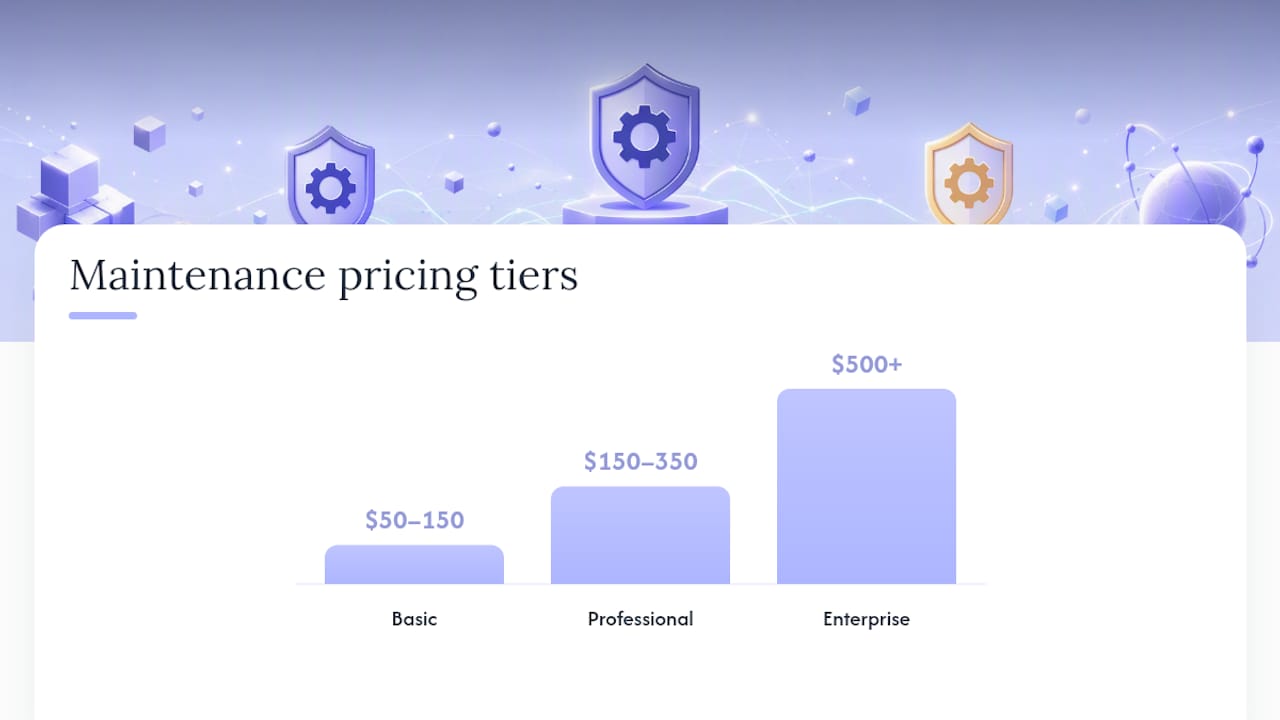
Quick stat: The $50 to $500 monthly range isn’t arbitrary. It reflects the actual labour difference between a static five-page site and a site with logins, payments, and third-party integrations that all need monitoring separately.
What typically drives a quote from the low end to the high end:
- Number of integrations. Every payment gateway, booking system, or CRM connection is another thing that can break and another thing someone has to monitor.
- Traffic volume. Higher traffic means more server load, more security exposure, and often a need for faster response times.
- SLA requirements. A guaranteed one-hour response time costs more to staff than a “we’ll get to it within 48 hours” arrangement.
- Support hours included. Plans differ on how many hours of small edits or content updates are bundled in before hourly billing kicks in.
Billing models vary too. Some providers charge a flat monthly subscription, others work on a retainer with a bucket of hours, and some smaller freelancers bill hourly with no fixed plan at all. Hourly arrangements can work for very simple sites, but they make budgeting unpredictable the moment something urgent comes up. If you’re still scoping your overall site budget, it helps to look at typical small business website costs alongside ongoing maintenance, since the two numbers should be planned together, not separately.
Should you handle maintenance yourself or hire a provider?
DIY maintenance works fine for a simple, low-traffic site where the owner is comfortable in the CMS and the business doesn’t depend heavily on uptime. It stops working the moment your site takes payments, stores customer data, or generates a meaningful share of your leads. At that point, the time cost of doing it right yourself usually exceeds what a provider charges, a pattern that shows up consistently in hiring and cost data for web development work.
If you’re hiring, a competent provider should offer these without you having to ask:
- A staging environment for testing updates before they go live, since staging-first workflows are what actually prevent update-related outages.
- Documented, tested restores, not just a claim that backups exist.
- A written incident response time, so you know what “we’ll fix it fast” actually means in hours.
- Regular reporting you can read without a technical translator.
Before signing anything, ask directly: How long are backups retained? What’s the guaranteed response time for a down site? Who besides me has admin access, and how is that access logged? Can I see a sample monthly report? Can I talk to an existing client?
Pro Tip: Ask every provider one blunt question: “Walk me through the last time you restored a client’s site from backup.” A vague answer or a long pause tells you more than their pricing page ever will.
Cost estimation gets easier once you separate fixed costs (hosting, the base monthly plan) from variable ones (emergency fixes, extra content updates, custom development). A provider who can’t break that down clearly is a provider who’ll surprise you later.
What do sample website maintenance packages look like?
Basic plan ($50 to $150/month). Covers daily uptime checks, weekly backups, monthly CMS updates, and basic malware scanning. Fits a small local-business site with no eCommerce and low traffic. Doesn’t include content edits or performance optimisation beyond the basics.
Professional plan ($150 to $350/month). Adds monthly performance optimisation, a set number of content-edit hours, monthly reporting, and quarterly security audits. Fits a business relying on lead-gen forms, email capture, or moderate traffic where downtime has a real cost.
Enterprise or eCommerce plan ($500+/month). Includes 24/7 monitoring, real-time or near-real-time backups, dedicated developer support, and faster SLA response. Fits sites processing payments, managing inventory, or running on custom code that needs someone who understands the build.
Add-ons like SEO monitoring, A/B testing, or advanced analytics dashboards usually price separately, often as an hourly add-on or a flat monthly fee layered on top of the base plan. Price them the same way you’d price the base tier: by the actual time they take, not a flat guess.
What tools and services actually reduce maintenance risk?
A handful of tool categories do most of the heavy lifting, and knowing what each one does helps you ask providers the right questions instead of taking their word for it.
- Uptime monitoring services ping your site every few minutes and alert someone the moment it goes down, because minutes of downtime during peak traffic can mean real lost revenue.
- Backup services with off-site storage protect you if your host’s server fails entirely; a backup stored on the same server it’s protecting isn’t a backup.
- Staging environments let updates get tested on a copy of the live site first, catching plugin conflicts before customers ever see them.
- Security scanners checked against known vulnerability lists like the OWASP Top Ten catch issues generic malware sweeps miss.
- Performance monitors tracking Core Web Vitals flag slow-loading pages before they hurt your search rankings, not after.
Platform choice affects which tools you’ll need. A WordPress site has a much larger plugin attack surface than a locked-down hosted platform, which changes how much security scanning actually matters for your setup.
How does a maintenance plan run month to month?
Onboarding sets the tone for everything after. A provider worth hiring starts with a full audit, fixes any baseline issues they find, sets up a staging environment, gets secure access to your credentials, and locks in a task schedule before billing you for month one.
From there, the rhythm repeats:
- Updates get tested on staging, then pushed live.
- Security scans and backup verifications run on schedule.
- Small content edits get handled within whatever hours the plan includes.
- A monthly report goes out covering uptime percentage, updates applied, any incidents, and performance trends.
- You get a chance to flag priorities for the next cycle.
A report that just says “all good” isn’t worth much. You want specifics: what got updated, what was found, what changed in load time. If you ever doubt the work is happening, ask for a restore test on demand, check access logs, or pull the ticket history. A provider with nothing to hide will hand this over without friction.
Why Tech Business Development recommends managed maintenance for small businesses
Tech Business Development builds its own maintenance workflows around automation because manual, one-off fixes are where errors creep in. Combining scheduled monitoring with AI-driven checks catches issues faster and cuts the manual labour costs tied to constant human review. This fits businesses that depend on their site for leads or sales and can’t afford the guesswork of ad-hoc fixes. If your site is still a side project with no real traffic, the calculation changes.

How Tech Business Development can help you stay maintained without the overhead
Hiring a traditional agency for ongoing maintenance often means a slow onboarding process, unclear reporting, and a price that climbs every time you add a service. Tech Business Development runs website maintenance, staging, backups, and Google services setup (GA4, GTM, GMB) under one roof, so you’re not juggling three vendors for one site.

The advantage is speed and consolidation: automated monitoring catches problems before they become emergencies, and onboarding is built to get your baseline audit and staging environment running fast, not weeks from now. That matters if you’re currently patching things yourself or paying a freelancer per incident with no real plan behind it. A technical SEO audit is often the clearest way to see exactly where your current setup is exposed. Start with a free site audit through Tech Business Development to see what a properly maintained version of your site would actually look like.
Sources
- What is a website maintenance plan? (Elementor)
- Website maintenance 101: Everything you need to know to get started | Webflow Blog
- OWASP Top Ten
- CISA tips (basic cyber hygiene)
Recommended