Fix Your GBP Service Area First: Service Area SEO for Small Businesses

Set your Google Business Profile service area correctly and publish a small set of unique service area pages. That single move produces the fastest boost in local visibility for any service-area business (SAB). Those two pillars, your GBP configuration and your on-page content, carry most of the ranking weight when you have no storefront for Google to anchor to, and Google’s own guidance on service-area businesses is the standard everything else builds on.
TL;DR:
- Properly configuring your Google Business Profile to hide your address and define targeted service areas is crucial to maximize local visibility and avoid irrelevant radius restrictions.
- Creating unique, region-specific service area pages with detailed local content and accurate service information can significantly improve rankings for city-based searches.
- Internal linking, URL structure, and schema markup that reflect each serviced region help Google better understand and rank your coverage areas.
- Tracking city-level performance with Google Search Console, geo-rank tools, and conversion events allows you to focus efforts on high-impact SAPs and improve overall leads.
- Outsourcing GBP setup, service area page creation, and tracking automation to specialized providers can be a cost-effective way for small businesses to optimize local SEO without in-house resources.
Table of Contents
- How Google Business Profile service areas work and how to set them
- Service area pages: when to use them and how they differ from location pages
- On-page SEO for service area pages: URLs, content, schema and internal linking
- Google Business Profile optimisation and reputation signals for SABs
- Measuring coverage and results: GSC, GA4, rank grids and KPI selection
- Common mistakes and spam triggers that reduce SAB visibility
- How Tech Business Development sequences service area SEO for clients
- Get your GBP and service area pages fixed without hiring in-house
- Sources
- FAQ
How Google Business Profile service areas work and how to set them
Google treats businesses in two buckets: storefront businesses with a public address, and service-area businesses that travel to the customer, like plumbers, electricians, cleaners, and mobile mechanics. A hybrid business does both, maybe a landscaper with a small retail yard who also drives to job sites across the county. Which one you are determines how you configure your profile, and getting this wrong is the single most common reason SABs underperform.
The address visibility toggle matters more than most owners realize. If you run a true SAB, hide your business address in GBP settings. Leaving a home or shop address visible when you don’t serve walk-in customers there confuses Google’s ranking algorithm and, according to Google’s own documentation, can restrict your visibility to a tight radius around that pin instead of your actual coverage area.
To add or edit service areas, go to your GBP dashboard, select Business Information, then Service Area. You can define coverage using cities, postal codes, or counties, and Google caps you at 20 total locations. BrightLocal recommends mixing these unit types rather than relying on one, since a handful of precise postal codes often outperforms a vague county-wide claim.
Watch for these setup mistakes, which quietly cap your reach:
- Leaving a residential address visible when you should have it hidden
- Setting a radius that’s too broad, diluting relevance for every city inside it
- Listing service areas that don’t match where your website content actually talks about you working
- Forgetting to update the list as your crew’s actual coverage grows or shrinks
Service area pages: when to use them and how they differ from location pages
A service area page (SAP) is a landing page built around one city, region, or neighbourhood you serve, distinct from a location page, which represents a physical address; for a deeper dive on building organic authority through such pages, see our partner’s practical playbook on building authority online. SAPs exist because a plumber with no storefront in Burlington still needs a page that can rank when someone searches “plumber Burlington.” Search Engine Land’s guide to service area pages confirms this is the mechanism non-storefront brands use to compete for city-level queries they’d otherwise have no shot at.
Not every city on your GBP list needs its own page. Here’s a practical way to decide:
- Build a dedicated SAP for any city or region that generates real search volume or represents a meaningful share of your revenue.
- Group smaller, adjacent towns into a single regional page when individual search volume is too thin to justify separate content, say, five small townships within a 20-minute drive of each other.
- Use a store locator or coverage map page only as a supplementary index, never as a replacement for the SAPs themselves, since it rarely ranks for anything specific.
- Retire or merge pages that get zero traffic after six months. A thin page dragging on your site does more harm than no page at all.
The trap most businesses fall into is duplicating one template across a dozen cities with only the city name swapped. Google can detect this pattern, and it’s treated as a doorway page, content built purely to capture search traffic with no unique value. Keep each SAP genuinely different with this checklist:
- Reference specific neighbourhoods, landmarks, or local conditions relevant to that service (well water issues in one town, older housing stock in another)
- Include a short case study or project example from that specific area
- List the exact services offered there, not a generic company-wide list
- Note real availability or response times for that region if they differ from your average
That last point is easy to skip and it shouldn’t be. A page that says “we typically respond within two hours in the Oakville area” reads as lived experience, not boilerplate.
On-page SEO for service area pages: URLs, content, schema and internal linking
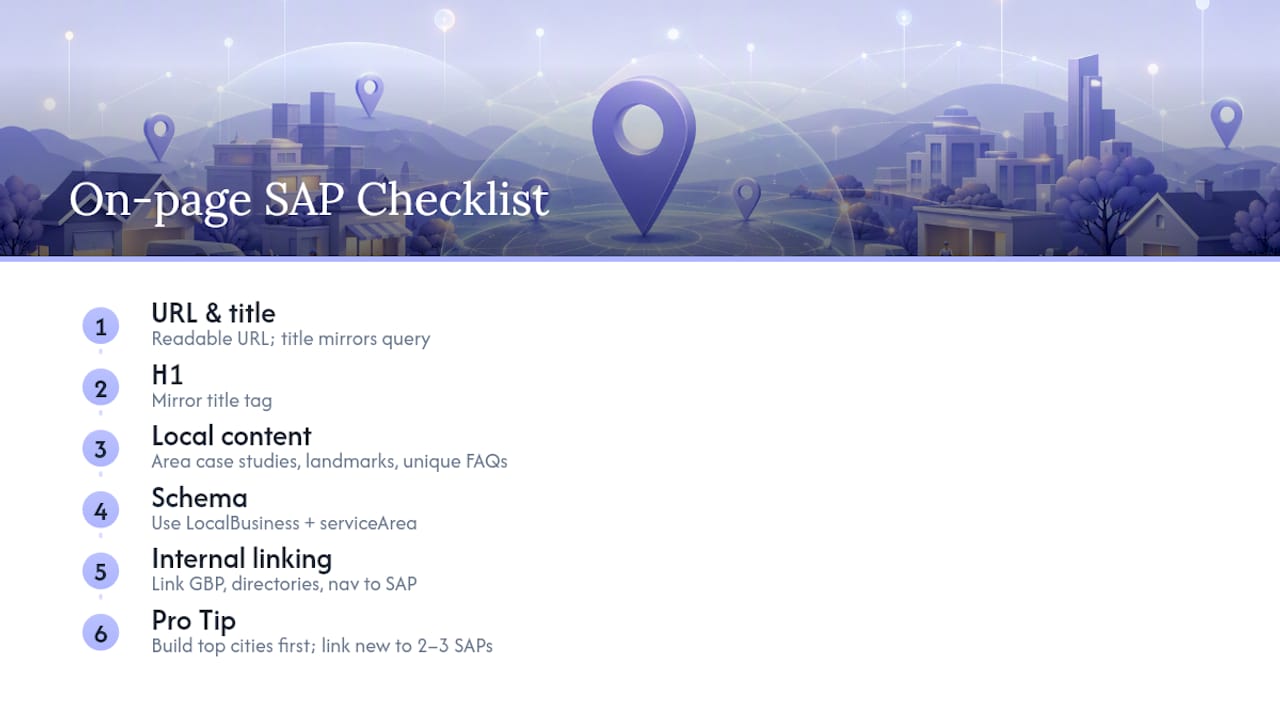
Your URL structure should be predictable and readable: yoursite.com/services/[service]-[city], like /services/roof-repair-milton. Keep the title tag close to how a real person searches: “Roof Repair in Milton, Ontario | [Business Name]” beats a keyword-stuffed string every time. Your H1 can mirror the title tag almost exactly, since this isn’t the place to get clever.
Content is where most SAPs fail or succeed. Search Engine Land notes that genuinely local content, area-specific case studies, FAQs unique to that region, references to actual landmarks, consistently outperforms templated pages with the city name swapped out. Write like you’ve actually worked there, because presumably you have.
For schema markup, implement LocalBusiness or Service structured data on each SAP, specifying the areaServed property for that page’s target region. This isn’t mandatory for ranking, but it helps Google parse exactly which page maps to which coverage area, especially useful once you have more than five or six SAPs live.
Internal linking deserves more attention than it usually gets. Your GBP profile link, your directory listings, your homepage navigation, all of it should point to the specific SAP for that city rather than dumping everyone on your homepage. Search Engine Land’s guidance is direct about this: routing traffic to the most relevant page instead of a generic landing page creates a smoother path from search to conversion.
Pro Tip: Build your SAPs in priority order, highest-revenue city first, and link each new page back to your two or three strongest existing SAPs. This spreads authority across your site instead of pooling it all on the homepage.
Google Business Profile optimisation and reputation signals for SABs
Your primary category should describe what you are, not everything you could theoretically do. A mobile dog groomer picks “Pet Groomer,” not “Pet Store.” Secondary categories fill in adjacent services, and the Services section within GBP should list offerings in plain language matching how customers actually search, not internal jargon.
Photos carry more weight for SABs than owners tend to think, since you’re compensating for the absence of a storefront customers can see from the street.
- Post crew and van photos so people recognize who’s showing up at their door
- Add before-and-after shots for any visually demonstrable work (renovations, landscaping, cleaning)
- Upload on-site work images regularly, not just once at profile setup
- Use GBP Posts to show recent jobs in specific service areas, reinforcing the geographic claims on your SAPs
Reviews function as your substitute for proximity signals. BrightLocal points out that SABs lean harder on prominence and relevance signals, reviews and content authority chief among them, because there’s no storefront pin doing passive work for them. Ask for a review within 24 hours of finishing a job, while the experience is fresh, and respond to every review, good or bad, within a few days. A pattern of thoughtful responses signals an active, accountable business to both customers and Google.
Local Services Ads can be worth running alongside your organic SAP work, particularly in competitive trades like HVAC or legal services, but they work best as a complement to a solid organic foundation, not a substitute for one.
Measuring coverage and results: GSC, GA4, rank grids and KPI selection
Track city-level keyword impressions and clicks in Google Search Console, filtered by page, so you can see which SAPs are actually earning visibility. Pair that with a geo-grid rank tool, which shows ranking position across a grid of points within a city rather than one average number. BrightLocal’s own research found that a geo-grid view produces far more actionable insight than a single rank check, since visibility often varies block by block within the same city.
- Set up GA4 conversion events for phone clicks, form submissions, and booking completions on each SAP
- Tag events by landing page so you know exactly which city page is driving calls
- Prioritize improvements on SAPs with high impressions but low click-through or conversion rates first
- Deprioritize pages with neither traffic nor conversions until you’ve fixed the ones already showing promise
Given that mobile devices account for the majority of web traffic, a SAP that loads slowly or buries its phone number on mobile is losing calls before a visitor ever reads your content.
Common mistakes and spam triggers that reduce SAB visibility
A residential address left visible on GBP is the single most damaging configuration error for a true SAB. Google’s guidance is explicit that this can shrink your ranking radius down to almost nothing around that address instead of your intended coverage area.
- Duplicate or near-duplicate SAPs invite doorway-page treatment. Consolidate thin, repetitive pages instead of pumping out more of them.
- Inconsistent NAP (name, address, phone) across directories erodes trust signals Google uses to confirm you’re a legitimate, stable business. Run a NAP consistency audit across your top listings.
- Chasing quick citation-building hacks or bought reviews rarely survives a Google update. Building genuine local authority, real reviews, real project photos, real local content, holds up over time.
How Tech Business Development sequences service area SEO for clients
Most small operators try to fix everything simultaneously and end up finishing nothing. The sequence that actually works starts narrow: correct the GBP service-area configuration first, since a misconfigured profile undermines every page you build afterward. From there, launch SAPs only for your two or three highest-revenue cities, not all twenty at once.
Automation earns its place in step three. A two-person crew can’t manually track calls, bookings, and lead sources across a dozen city pages, so wiring up automated lead capture and booking flows lets a small team manage coverage that would otherwise require a marketing hire. Clients typically see phone calls and booking inquiries shift first, usually within the first couple of months, with broader ranking gains across the full SAP rollout following over the next two to three quarters as content authority builds.
— Shayan Shirvani
Get your GBP and service area pages fixed without hiring in-house
There are services available that can handle your GBP setup, priority service area pages, and tracking automation to measure what’s working, potentially at a fraction of the cost of a dedicated hire.

If your service-area business needs its Google Business Profile corrected, a handful of properly written SAPs built for your top cities, and GA4/GTM wired up to track calls and bookings automatically, these tasks can be managed by specialized service providers for small and local businesses. Rather than guessing at schema markup or wondering why your address setting is capping your reach, get it audited and fixed by people who do this daily. Visit the Tech Business Development services page to request a free GBP and SAP audit, or book a consultation to map out which cities deserve a dedicated page first.
Sources
- Manage your service areas for service-area & hybrid businesses
- Service Area Pages: Boost Local SEO Across Locations
- Statista: Share of website traffic coming from mobile devices
FAQ
What is the service area of a business?
A service area is the geographic region, defined by cities, postal codes, or counties, where a business travels to deliver work rather than serving customers at a fixed storefront address.
What is SEO for service businesses?
It’s the practice of optimizing a Google Business Profile, website content, and local citations so a business without a public storefront can still rank for searches tied to the cities and regions it serves. Tech Business Development handles this specifically for small service-area businesses, from GBP setup through service area page creation.
What does “service area” mean on Google Business Profile?
On a Google Business Profile, “service area” is a setting where you list up to 20 cities, postal codes, or counties you serve instead of, or alongside, a visible business address.
What’s the difference between local SEO and service area SEO?
Local SEO broadly covers any effort to rank in local search results, while service area SEO specifically addresses the configuration and content needs of businesses that lack a storefront customers can visit, focusing on GBP service-area settings and dedicated service area pages rather than a single physical location.