Marketers: Recover Offline Sales with GCLID and Enhanced Conversions


Offline conversion tracking is the process of matching sales, calls, and leads that close outside your website back to the ad click or campaign that started them. The fastest way to start getting value from it is simple: make sure your site captures the GCLID on every click and turn on enhanced conversions for leads in your Google Ads account. Both Google and Meta accept offline uploads through their own platform documentation, so that’s where implementation actually begins.
TL;DR:
- Offline conversion tracking improves ad spend accuracy by capturing sales and leads that occur outside the website, such as calls and in-store purchases.
- Combining GCLID-based imports with enhanced conversions for leads offers the most reliable and durable measurement, especially over long sales cycles.
- Proper setup requires persistent GCLID capture at contact points, precise timestamp formatting, and regular uploads using Data Manager or APIs to prevent data loss.
- Call tracking should focus on qualified calls exceeding specific duration or disposition thresholds to prevent noise from unqualified calls.
- Maintaining a durable pipeline involves owner-verified reconciliation, handling schema changes, and frequent data uploads to avoid silent tracking failures.
Table of Contents
- Why offline conversions matter for your ad spend
- Which offline tracking method should you start with?
- How do you set up offline conversion tracking in Google Ads?
- How do you track phone call conversions accurately?
- Why isn’t my offline conversion data matching up?
- When should you move to automated, server-side delivery?
- What our clients actually go through implementing this
- Get your offline conversion pipeline built without the guesswork
- Where to go for the technical details
- Sources
- FAQ
- An editorial take on why most offline tracking setups fail quietly
Why offline conversions matter for your ad spend
Most of the sales that come from your advertising never happen on your website. A prospect clicks a search ad, calls the shop two days later, and buys in person. A B2B lead fills out a form, then closes six weeks later after three sales calls. A retailer runs a Google Shopping ad, and the actual purchase happens at the register. None of that shows up in your ad account by default, which means your bidding algorithm is optimising against a fraction of the real outcome.
That gap distorts everything downstream. Return on ad spend calculations look worse than reality, budget gets pulled from campaigns that are secretly working, and you lose visibility into which keywords bring in your highest-value customers.
Closing that gap delivers a few concrete wins:
- Smart Bidding optimises against real revenue instead of guessed proxies like form fills or page views.
- ROAS and cost-per-acquisition numbers reflect what the business actually collected, not just what happened on-screen.
- Budget shifts toward the campaigns generating closed business, not just clicks.
- You get visibility into which customer segments are worth the most, long after the first click.
Which offline tracking method should you start with?
There isn’t one correct method. Most advertisers end up running two or three in parallel, because each one covers a gap the others miss.
GCLID-based imports remain the most precise option when the identifier survives the customer journey. A GCLID (Google Click Identifier) is a string Google Ads appends to your landing page URL on every ad click. Capture it with a hidden form field or a script that reads it from the URL and stores it in a cookie or localStorage, then push it into your CRM the moment a lead is created. The catch: GCLIDs expire, and cookie restrictions or long sales cycles can break the chain before the deal closes.
Enhanced conversions for leads exist for exactly that problem. Instead of relying purely on a click identifier, you hash a customer’s email or phone number (SHA-256) and send that alongside your conversion data. Google matches it against signed-in Google accounts. It’s a durability play. Google itself now recommends this as the preferred path over standalone GCLID imports, largely because it survives cookie loss and long buying cycles better.
Call tracking splits into two tiers. Google’s own forwarding numbers give you basic call reporting with almost no setup cost. Dynamic number insertion (DNI) swaps in a session-specific number for each visitor, which lets you tie a call back to the exact click, keyword, and even landing page that generated it. DNI takes more setup but pays off once call volume justifies the qualification work.
In-store and point-of-sale matching covers everything from asking “how did you hear about us” at checkout to QR codes on receipts to matching loyalty account emails against your ad platform’s hashed customer lists. It’s messier than digital tracking. However, it’s often the only way to close the loop for brick-and-mortar businesses.
One platform note worth flagging early: Google and Meta expect different payload formats and enforce different match windows, so a pipeline built only for Google Ads won’t automatically work for Meta’s Conversions API. Build for both if you’re running both.
Pro Tip: Don’t treat GCLID imports and enhanced conversions as either/or. Run them in parallel. GCLID gives you precision when it survives; enhanced conversions catch the leads that would otherwise fall through entirely.
How do you set up offline conversion tracking in Google Ads?
Setting this up correctly takes a coordinated effort between marketing and whoever manages your CRM, but the sequence is consistent across most implementations.
- Create your conversion actions in Google Ads. Decide whether each offline action (call, closed deal, in-store sale) is a primary conversion for bidding or an observation-only metric you’re just watching.
- Capture the identifier at the point of first contact. Read the GCLID from the URL parameter and store it in a cookie, localStorage, or a hidden form field, and make sure it gets written to both the contact record and the opportunity/deal record in your CRM, not just one or the other.
- Turn on enhanced conversions for leads. Configure it through your Google tag or Google Tag Manager, accept Google’s customer data terms, and normalize and hash first-party data (email, phone) with SHA-256 before it’s sent.
- Pick your upload method. Google’s Data Manager scheduled import is now the recommended route, since Google is actively migrating offline upload workflows toward it. The API (using UploadClickConversions) suits higher-volume, developer-supported teams, while CSV upload still works fine for lower-volume, manual workflows.
- Include every required field. At minimum: GCLID or hashed PII, conversion action name, conversion_time (with correct time zone formatting), conversion value, currency, and order_id when you have one.
- Set your upload cadence and track diagnostics. Google’s own guidance links daily or near-daily uploads to faster Smart Bidding responsiveness, and every upload job should carry a job_id you can check against Google’s diagnostic reports later.
The single most common failure in this sequence isn’t technical complexity. It’s step two. Marketing teams capture the GCLID fine, but it never makes it onto the opportunity record, so by the time a deal closes, the identifier that would have connected it back to the ad click is nowhere to be found.
How do you track phone call conversions accurately?
Dynamic number insertion works by swapping the phone number displayed on your site for a session-specific number the moment a visitor lands, then logging the click metadata (campaign, keyword, GCLID) against whatever number that visitor sees. When the call comes in, your call tracking vendor already knows which ad triggered it.
The part most advertisers get wrong is treating every ring as a conversion. A 12-second hang-up and a 20-minute consultation booking are not the same event, and feeding both to your bidding algorithm as equal signals just adds noise. Define a “qualified call” using real thresholds: minimum duration (often 60 seconds or more), a positive disposition tag from whoever answered, or an actual booked appointment.
The integration flow typically looks like this:
- Call comes in through your tracking vendor, tagged with click metadata.
- The vendor pushes that call as an event to the matching CRM contact or opportunity.
- A qualification trigger fires once duration and disposition thresholds are met.
- The qualified call gets uploaded to Google Ads or Meta as an offline conversion.
If you’re starting from zero, begin with Google’s own call assets and forwarding numbers for basic reporting, then move to full DNI-based call tracking once call volume is high enough to justify the added setup.
Why isn’t my offline conversion data matching up?
The error you’ll see most often in Google’s API responses is CLICK_NOT_FOUND, which means the GCLID you uploaded either expired, was malformed, or never matched a real click in Google’s system in the first place. Check your upload window first. Google generally expects GCLID-based imports within roughly 90 days of the original click, and enhanced conversions for leads typically need to land within a shorter window (around 63 days), though these limits do shift, so verify current thresholds against Google’s API documentation before assuming your batch is compliant.
Timestamp formatting causes almost as much trouble. Your conversion_time field needs the correct time zone offset, and a sloppy conversion between your CRM’s server time and Google’s expected format will silently produce mismatches that look like missing conversions.
To confirm accuracy rather than guess at it:
- Check the enhanced conversions diagnostics report inside Google Ads for match rate and coverage warnings.
- Review job_id summaries after each upload to catch failed or partially rejected batches.
- Reconcile ad-platform conversion counts against your CRM’s closed-won totals for the same date range. Any significant gap usually points to lost GCLIDs, hashing mismatches, or delayed uploads.
Pro Tip: Send both a GCLID and hashed PII on the same conversion record whenever you can. If one identifier fails to match, the other often still gets you the attribution.
The most durable fix for all of this is boring but effective: persist GCLIDs on the opportunity record (not just the contact), send multiple identifiers per conversion, and upload more often so any single failure affects fewer records.
When should you move to automated, server-side delivery?
CSV uploads are perfectly fine when you’re testing the concept or your offline conversion volume is low. Once you’re running this across multiple ad platforms with real volume behind it, CSVs and point integrations start breaking under rate limits, schema changes, and the sheer manual effort of keeping exports current.
The production pattern at that stage is a server-side receiver: a webhook endpoint that listens for events from your CRM or accounting system, normalizes and hashes the identifiers, deduplicates events that might otherwise get counted twice, and fires parallel requests to both the Google Offline Conversions API and Meta’s Conversions API for offline events.
A few things matter for keeping that pipeline reliable long after launch:
- Persist click identifiers on both the contact and the deal/opportunity object. Attribution breaks constantly when a deal closes and the record that fires the “closed won” trigger never had the identifier attached in the first place.
- Build retry logic and alerting into the receiver itself, so a failed API call doesn’t just vanish quietly.
- Monitor for schema or API version changes on both platforms. Google’s own troubleshooting guidance treats this as an ongoing maintenance job, not a one-time setup task.
- Run a periodic reconciliation check between CRM revenue and reported ad-platform conversions to catch silent data loss early.
What our clients actually go through implementing this
Most small and local business clients we work with come in with a Google Ads account bidding on form fills or calls, no visibility into what actually closed. The typical project runs through four phases: an audit of the existing tagging and CRM setup, GCLID and enhanced conversions capture, CRM field mapping so identifiers persist through to closed deals, and finally webhook or API wiring for automated uploads with a reconciliation test at the end.
Realistically, clients see bidding improve within a few weeks once Smart Bidding has enough real conversion data to work with. The bigger win shows up over months, when reconciliation between the CRM and the ad platform stays consistent instead of drifting apart.
Get your offline conversion pipeline built without the guesswork
Reading a checklist is one thing. Wiring GCLID capture, hashed PII matching, and CRM field mapping into a system that survives a schema change six months from now is another. Tech Business Development builds that pipeline for small and local businesses as part of its CRM integration and marketing system work, handling Google Ads and CRM setup together instead of leaving you to stitch two vendors’ documentation into something that actually talks to each other.

A starter engagement typically covers an audit of your current tracking gaps, quick fixes to capture what you’re already losing, automated upload setup so you’re not manually exporting CSVs every week, and enough training that your team can maintain it after we leave. Plans start at $499 per month under the Startup tier, scaling up through Growth and Scale as your data and automation needs grow, all detailed on the pricing page. If you’re ready to stop guessing which campaigns actually produce closed revenue, that’s where to start.
Where to go for the technical details
- About offline conversion imports, Google’s own reference for GCLID imports, enhanced conversions setup, and the move to Data Manager.
- Upload offline conversions, the developer documentation covering payload fields, hashing requirements, and error codes like CLICK_NOT_FOUND.
- How offline conversion tracking works with Google Ads, a practical walkthrough of the capture, persist, trigger, upload pipeline.
- Lead nurturing and conversion strategies, useful background on CRM hygiene that keeps offline matching accurate over time.
Sources
- About offline conversion imports - Google Ads Help
- Upload offline conversions - Google Ads API docs
- How Offline Conversion Tracking Works with Google Ads
FAQ
Can you run Google Ads without conversion tracking?
Yes, but Smart Bidding has nothing real to optimise against without it, so you’re essentially bidding blind on assumptions about which clicks matter. You can still run search or display campaigns on manual bidding, but you’ll be guessing at performance instead of measuring it.
How do you set up offline conversion tracking in Google Ads?
Create a conversion action, capture the GCLID (or hashed customer data through enhanced conversions for leads) at the point of contact, persist it in your CRM through to the closed deal, and upload it through Data Manager, the API, or CSV. Daily uploads give Smart Bidding the fastest feedback loop.
How do you track conversions that happen offline?
The two most reliable methods are GCLID-based imports tied to your CRM’s closed-won records and enhanced conversions for leads using hashed email or phone data. Call tracking and point-of-sale matching fill the gaps for phone-led and in-person sales that neither method catches on its own.
When should you use offline conversions?
Use offline conversion tracking any time a meaningful share of your sales or leads close outside your website, whether that’s phone calls, CRM-managed sales cycles, or in-store purchases. If your bidding data only reflects on-site form fills, you’re likely missing the majority of your actual revenue signal.
What does managed offline conversion setup cost?
Tech Business Development’s managed implementation work is available through service plans starting at $499 per month under the Startup tier, with Growth and Scale tiers priced higher for more complex CRM and automation needs. Exact scoping depends on how many platforms and CRM systems need to be wired together.
An editorial take on why most offline tracking setups fail quietly
The conventional advice treats offline conversion tracking as a one-time integration project: wire up the GCLID, flip on enhanced conversions, upload a CSV, done. That framing is what causes most of these pipelines to fail, usually within two or three months, and almost always without anyone noticing until someone asks why ROAS suddenly looks worse.
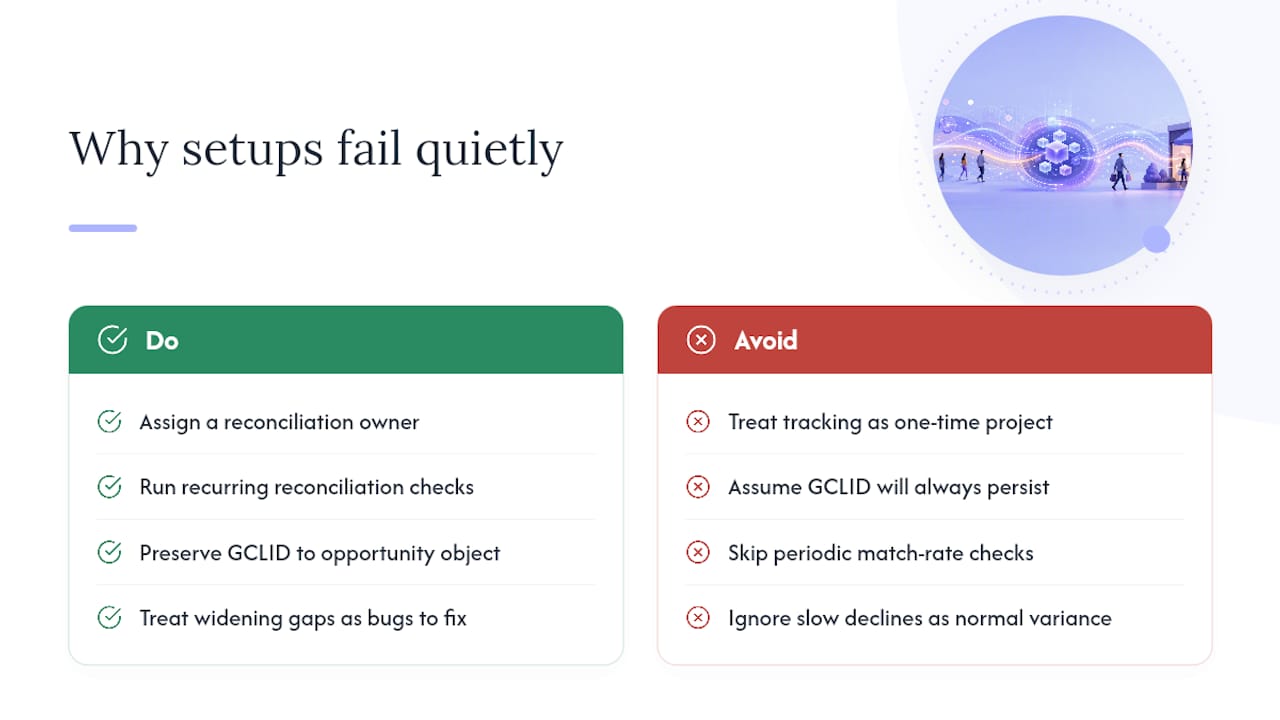
The failure point is rarely the initial setup. It’s the assumption that a GCLID captured on a contact record will still be there when a deal closes ninety days later, after that lead passed through four different CRM stages and possibly a different sales rep. Identifiers get overwritten, deduplicated away, or simply never copied onto the opportunity object in the first place. Nobody notices because the ad account keeps reporting conversions, just fewer of them than it should, and a slow decline in match rate looks a lot like normal performance variance until you actually reconcile against CRM revenue.
What separates a durable setup from a fragile one isn’t the sophistication of the tools. It’s whether someone owns the reconciliation check on a recurring basis and treats a widening gap between CRM closed-won and platform-reported conversions as a bug to fix, not background noise. Most businesses skip that step entirely, which is exactly why so many “offline conversion tracking” implementations quietly stop working within a quarter of launch.
— Shayan Shirvani
Recommended