How to set up invoice automation for AP teams


Set up your invoice automation in this sequence: enable a central capture channel (email inbox, supplier portal, or scanned upload), connect a parsing engine with confidence scoring, configure your matching policy (two-way or three-way), then activate an automated posting task for touchless posting of qualified invoices. Run a pilot batch before opening the floodgates.
Here is the minimal sequence that produces a working automated flow:
- Enable capture first. Point a dedicated email inbox, a supplier portal, or a watched folder at your ingestion engine. Email ingestion is the highest-leverage starting point because the majority of invoices already arrive by email.
- Connect a parsing engine. Choose a solution that combines OCR with AI-based intelligent document processing (IDP) and returns a confidence score per field. Low-confidence extractions should route to a human-review queue automatically, not silently fail.
- Set your matching policy. Decide whether two-way matching (invoice against purchase order) or three-way matching (invoice against PO and goods receipt) fits your procurement process, then configure the number of automatic matching attempts and your tolerance rules.
- Activate the automated posting task. In your ERP or AP platform, enable the option to automatically submit imported invoices to workflow and add an automated posting task so invoices that clear matching and approval post without a human keystroke.
- Schedule background tasks. Set matching and submission jobs to run hourly for high-volume operations or daily for lower-volume teams, then run a pilot batch of a small number of invoices before scaling.
Key takeaways
A well-configured invoice automation setup aims to reach a majority of straight-through processing within a few months when vendor data is clean, matching rules are tuned, and exception ownership is assigned before go-live.
| Point | Details |
|---|---|
| Start with scope and clean data | Define legal entities, vendor groups, and KPI targets; clean vendor master data before any configuration begins. |
| Enable capture and parsing first | Set up email ingestion and configure confidence thresholds so low-quality extractions route to a human-review queue automatically. |
| Configure matching and posting task | Enable auto-matching with multiple retry attempts, set tolerance rules, and activate the automated posting task for touchless processing. |
| Validate with a parallel pilot | Run 20–30 invoices through both manual and automated paths; go live only when extraction accuracy hits 95% and match rate hits 80%. |
| Tech Business Development | Delivers end-to-end AP automation setup for Canadian businesses, from ERP integration and workflow design to training and 30-day hypercare. |
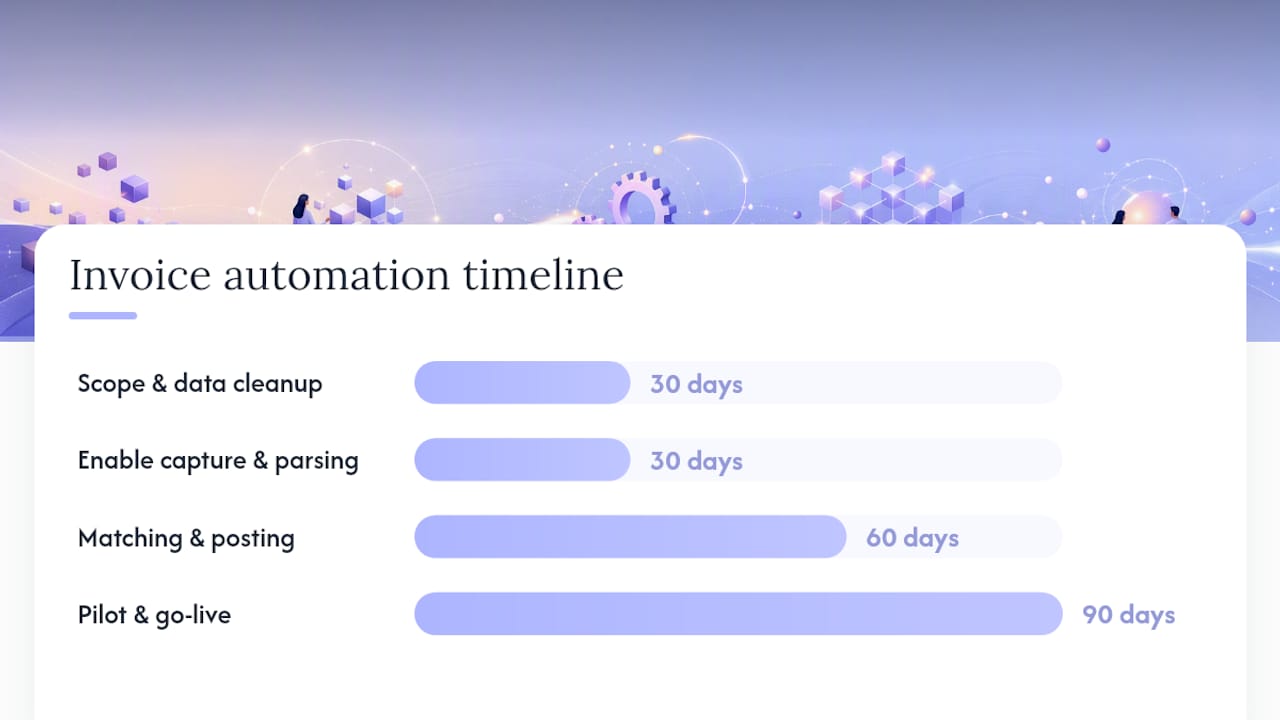
30 days: Agree scope, enable capture channels, run extraction tests against real vendor invoices, and complete vendor master clean-up.
60 days: Enable matching rules with tolerance configuration, configure approval workflow with automated posting task, and run a parallel pilot with your top-volume vendors.
90 days: Flip production for all in-scope vendors, monitor STP rate and exception rate weekly, and tune confidence thresholds and matching attempts based on live data.
Table of Contents
- What do you need to decide before you configure anything?
- What are the key components of an automated invoicing process?
- Step-by-step invoice automation setup checklist
- How do you test and validate before go-live?
- What KPIs should you monitor after go-live?
- What are the most common invoice automation pitfalls?
- How Tech Business Development implements invoice automation
- What most AP teams get wrong about invoice automation
- Cut AP processing costs with a configured automation system
- Sources
What do you need to decide before you configure anything?
Jumping into configuration before you have defined scope is the most common reason implementations stall. Two weeks of upfront decisions saves two months of rework.
Define your scope clearly. List the legal entities, invoice channels (email, portal, EDI, paper scan), vendor groups, currencies, and your monthly invoice volume. Not every entity or vendor needs to be in scope on day one. Starting with a limited scope and your main vendors by volume is a sensible pilot boundary.
Set measurable goals. Vague targets like “process invoices faster” produce nothing useful. Define a straight-through processing (STP) rate target (the percentage of invoices that post without human intervention), an acceptable exception rate, and a cycle-time goal from invoice receipt to payment approval. These become your go-live acceptance criteria. A stepwise implementation approach that begins with defining KPIs before selecting software is the standard recommended path.
Gather your prerequisites. Before a single configuration screen opens, confirm you have:
- Clean vendor master data (vendor IDs, addresses, payment terms, and tax registration numbers reconciled in your ERP)
- A functioning PO and goods-receipting process (three-way matching fails if receipts are posted late or inconsistently)
- API credentials or connector access to your ERP
- A confirmed list of AP approvers, their delegation rules, and exception-handling owners
- A decision on matching policy and tolerance rules (for example, a 2% price tolerance and a 5-unit quantity tolerance)
Pro Tip: Before configuring automation flags, review whether your business automation scope covers the right processes. Automating a broken manual process just produces broken results faster.
Decide your matching policy at this stage, not during configuration. Two-way matching suits service-based businesses or vendors where receipts are not tracked in the ERP. Three-way matching is appropriate when you have a purchase order and a goods receipt for every invoice. The choice directly determines which automation flags you enable and how many exceptions you should expect.
What are the key components of an automated invoicing process?
An automated invoicing process has five layers. Each layer has configuration choices that directly affect your STP rate and exception volume. Getting one layer wrong compounds problems downstream.
Capture layer
Your capture layer is where invoices enter the system. The main options are:
- Email ingestion inbox: A monitored mailbox that forwards attachments to your parsing engine. Fastest to configure and covers the majority of invoice volume for most Canadian businesses.
- Supplier portal: Vendors log in and submit structured data directly. Higher data quality, but requires vendor onboarding effort.
- EDI: Structured electronic interchange for high-volume, repeat suppliers. Highest accuracy, highest setup cost.
- Watched folders: Cloud folders (such as OneDrive or Google Drive) that trigger processing when a file lands. Useful for scanned paper invoices from a multifunction printer.
- Manual upload: A fallback for one-off invoices. Should never be your primary channel.
Build resilience by enabling at least two channels from day one. A supplier who cannot use your portal will email a PDF; your system needs to handle both.
Parsing and extraction
Extraction accuracy determines whether automation achieves straight-through processing or simply moves manual work into exception queues. Modern systems combine OCR with AI/IDP to extract header fields (vendor name, invoice number, date, total, tax) and line items (description, quantity, unit price, GL code). Configure a confidence threshold below which the invoice routes to a human-review queue rather than proceeding automatically.
Extraction is the single biggest limiter to straight-through processing. Invest in high-quality IDP with confidence scoring and a practical human-review workflow — without those two elements, every low-quality scan becomes a manual task wearing an automation label.
Line-item extraction is harder than header extraction and fails more often on non-standard layouts. Test your parsing engine against a representative sample of your actual vendor invoices, including scanned paper, before committing to a configuration.
Matching engine
The matching engine compares extracted invoice data against your ERP records. Key configuration choices include:
- Two-way vs. three-way matching: Two-way checks invoice against PO; three-way adds the goods receipt. Three-way matching, configurable approval routing, and duplicate detection are the capabilities that most directly affect exception rates.
- Number of automatic matching attempts: Set multiple attempts with a delay between runs. This handles timing gaps where a receipt is posted after the invoice arrives.
- Tolerance rules: Define acceptable price and quantity variances. A tight tolerance (0%) maximises control but increases exceptions; a 2–3% price tolerance is common for goods invoices.
Workflow engine and automated posting task
Once an invoice clears matching, it enters the approval workflow. Configure routing rules based on invoice amount, vendor, cost centre, or GL account. For invoices that clear all checks automatically, an automated posting task posts them to the ERP without requiring a human to click “post.” This is the mechanism that produces touchless processing. Enable “automatically submit imported invoices to workflow” only when an active, tested workflow exists in your system.
Pro Tip: Use approval routing patterns from your existing business workflows as a template. The logic is the same: conditions trigger actions, exceptions escalate to owners.
ERP integration
Map every extracted field to its ERP equivalent before go-live: vendor ID, GL account, cost centre, tax code, PO line, and currency. Duplicate detection rules should check invoice number plus vendor ID as a minimum. Maintain an immutable audit trail for every automated action, which is a compliance requirement under Canadian federal and provincial record-keeping obligations.
Step-by-step invoice automation setup checklist
Follow this sequence. Each phase builds on the previous one; skipping ahead creates configuration debt.
Phase 1: Preparation (Days 1–5)
- Export and clean your vendor master: reconcile vendor IDs, addresses, tax numbers, and payment terms.
- Confirm your PO and goods-receipting process is consistent. Identify vendors where receipts are routinely late.
- Obtain API credentials or connector configuration for your ERP.
- Create a test legal entity or sandbox environment for configuration and UAT.
- Document your approver list, delegation rules, and exception-handling owners.
- Decide matching policy (two-way or three-way) and tolerance values.
Phase 2: Configure capture (Days 6–10)
- Set up a dedicated ingestion email inbox and connect it to your parsing engine.
- Configure watched folders or portal connectors for secondary channels.
- Define allowed sender domains and permitted file types (PDF, TIFF, XML, EDI).
- Test with five to ten real invoices from different vendors before proceeding.
Phase 3: Configure parsing (Days 11–15)
- Define document types (standard invoice, credit note, pro forma).
- Set confidence thresholds for auto-processing and human-review routing.
- Build a human-review queue with SLA timers and assigned owners.
- Run extraction tests against a sample of 20–30 invoices covering your most common vendor formats.
Phase 4: Set matching rules (Days 16–20)
- Enable invoice matching validation in your ERP or AP platform.
- Select “automatically match product receipts to invoice lines” for vendors with active POs and receipts.
- Set the number of automatic matching attempts to a few, with a retry interval of a few hours.
- Configure price and quantity tolerance rules per vendor group or globally.
- Test matching against draft invoices with known PO and receipt data.
Pro Tip: For the background task scheduling of your matching and submission jobs, set hourly runs for high-volume operations and daily runs for smaller teams. Microsoft Dynamics 365 documents both Hour and Daily as the supported frequency options for these background processes.
Phase 5: Workflow configuration (Days 21–25)
- Build approval routing rules: amount thresholds, vendor categories, cost-centre owners.
- Enable “automatically submit imported invoices to workflow” only after the workflow is tested end-to-end.
- Add an automated posting task for invoices that clear matching and workflow approval without exceptions.
- Define include/exclude flags: imported invoices can be auto-included; manual invoices may require explicit inclusion.
- Configure prepayment application rules and set the system to block follow-up automation if prepayment application fails.
Phase 6: ERP mapping and duplicate detection (Days 26–30)
- Map extracted fields to ERP fields: vendor ID, GL account, cost centre, tax code, PO line, currency.
- Configure duplicate detection: invoice number plus vendor ID as the minimum key.
- Test GL, cost-centre, and tax mappings using draft invoices in your sandbox.
- Confirm audit trail logging is active for every automated action.
| Setup phase | Key deliverable | Owner |
|---|---|---|
| Preparation | Clean vendor master, confirmed approver list | AP Manager |
| Capture config | Live ingestion inbox, tested file routing | IT / AP |
| Parsing config | Confidence thresholds set, review queue live | AP / Vendor |
| Matching rules | Tolerance rules documented, auto-match active | AP Manager |
| Workflow config | Approval routing tested, posting task enabled | Finance Lead |
| ERP mapping | Field mapping validated, duplicate detection on | IT / Finance |
| Pilot run | 20–30 invoices processed, metrics reviewed | AP Manager |
Phase 7: Pilot and rollout (Days 31–45)
- Select a pilot vendor group: high-volume, consistent PO-based suppliers with clean data.
- Run parallel processing: process the same invoices manually and via automation, then compare field-by-field accuracy.
- Measure extraction accuracy, match success rate, exception rate, and average processing time.
- Adjust confidence thresholds and tolerance rules based on pilot results.
- Scale to full vendor scope once pilot metrics meet acceptance criteria.
Operational items (ongoing)
- Assign user roles and permissions: AP approvers, exception handlers, read-only auditors.
- Set SLAs for human-review queues (for example, four business hours for standard invoices).
- Deliver a training session covering the review queue, override procedures, and escalation paths.
- Document the change management plan and communicate the go-live date to vendors.
How do you test and validate before go-live?
Testing is where most teams cut corners and pay for it in production. A structured UAT phase with defined acceptance criteria prevents that.
UAT test cases to run:
- Correct extraction of all header fields (vendor name, invoice number, date, total, tax amount, currency) from a clean PDF
- Multi-line item extraction from an invoice with 10 or more line items
- Handling of a rotated or low-resolution scanned invoice
- PO matching: invoice that matches a PO exactly, one with a price variance within tolerance, and one outside tolerance
- Three-way matching: invoice matched to both PO and goods receipt
- Tax calculation validation: GST/HST amounts extracted and matched to ERP tax codes
- Currency handling: a USD invoice processed against a CAD functional currency entity
- Duplicate detection: submitting the same invoice twice and confirming the second is blocked
Pilot metrics to track:
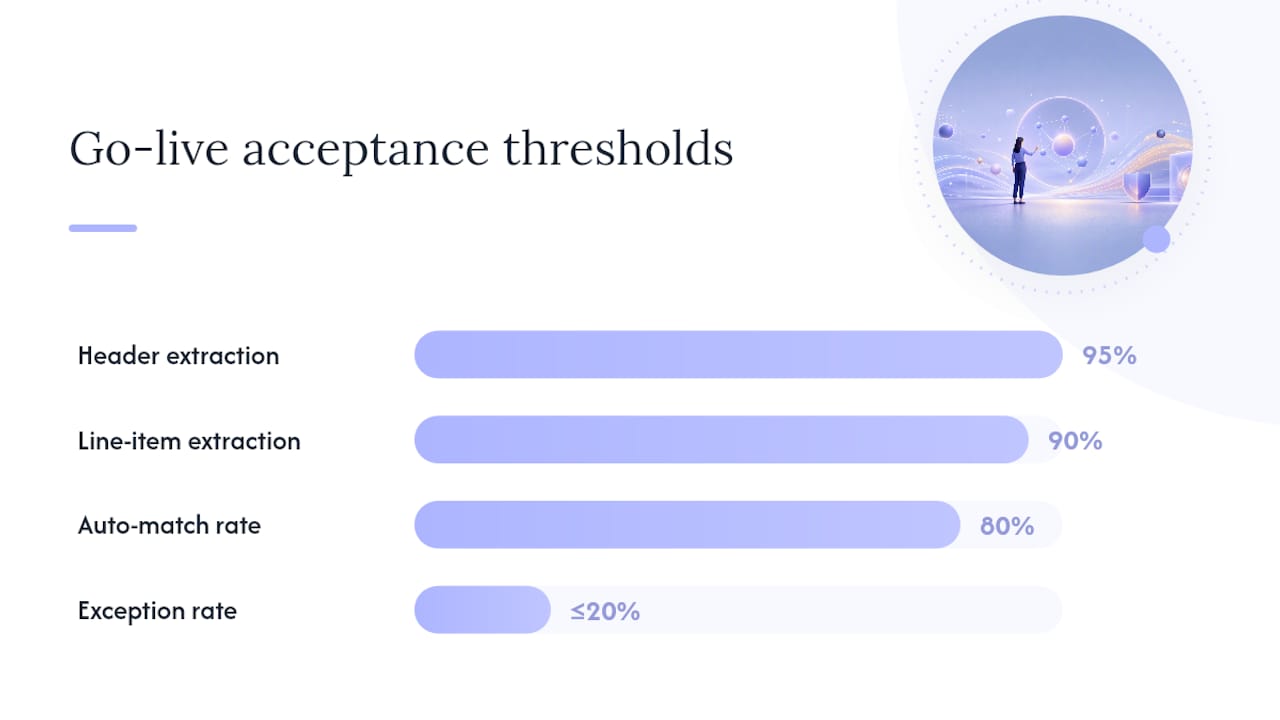
- Extraction accuracy by field (target: 95%+ for header fields, 90%+ for line items)
- Match success rate (target: 80%+ before human intervention)
- Exception rate (target: below 20% of total invoice volume)
- Average processing time from receipt to approval
- Human-review time per invoice in the exception queue
| Acceptance criterion | Minimum threshold for go-live |
|---|---|
| Header field extraction accuracy | 95% |
| Line-item extraction accuracy | 90% |
| Auto-match success rate | 80% |
| Exception rate | Below 20% |
| Duplicate detection | Fully effective duplicate blocking |
Pro Tip: Parallel pilot testing — running the same invoices through both manual and automated paths simultaneously — surfaces vendor-specific edge cases quickly. Most teams need only 20–30 invoices and one to two days to get a reliable read.
Go-live checklist:
- Pilot acceptance criteria met and signed off by AP Manager and Finance Lead
- Rollback plan documented: manual processing can resume within two hours
- Help-desk contact and escalation path communicated to the AP team
- Monitoring dashboards live and alerting configured
- Phased supplier cutover schedule confirmed (start with pilot vendors, add remaining vendors over 30 days)
- Vendor communication sent explaining the new submission process
What KPIs should you monitor after go-live?
Turning on automation is not the end of the project. The system needs tuning, and the KPIs tell you where to apply pressure. Automated reporting makes this continuous monitoring practical rather than a monthly manual exercise.
Core KPIs:
- Straight-through processing (STP) rate: The percentage of invoices that post without any human intervention. This is your headline metric. A well-configured system should reach 70–80% STP within 90 days of go-live.
- Invoice cycle time: Time from receipt to payment approval. Reductions here directly reduce late-payment penalties and improve supplier relationships.
- Exception rate: Percentage of invoices routed to human review. Track by exception type (extraction failure, match failure, approval hold) to identify where to focus tuning.
- Average human-review time: How long invoices sit in the exception queue. A rising number signals under-resourcing or unclear ownership.
- Cost per invoice: Total AP processing cost divided by invoice volume. Vendor analyses suggest manual handling costs can fall substantially when automation works end-to-end, but only when ERP integration is robust enough to avoid manual exports.
Health indicators to watch:
- Parsing confidence score distribution (a shift toward lower scores signals a new vendor format or degraded scan quality)
- Background job success and failure counts (a failing job means invoices are not being submitted or matched)
- Workflow queue length and SLA breach rate
- Top-exception vendors (a small number of vendors often drive a disproportionate share of exceptions)
A rising exception rate three weeks after go-live is almost never a technology problem. It is usually a vendor data problem or a receipting timing problem. Check your top-exception vendors before adjusting any system threshold.
Using KPIs to tune the system:
Adjust confidence thresholds if extraction accuracy is high but the review queue is overloaded. Increase matching attempts or widen tolerance rules if match failures are the dominant exception type. Reduce background-task frequency if job failures are caused by resource contention, or increase it if invoices are sitting unprocessed for too long. Prioritise vendor outreach for the top five exception-generating vendors before making system changes.
What are the most common invoice automation pitfalls?
Most failures are predictable. Here are the ones that appear most often and how to fix them.
Poor vendor data causing failed vendor matches. If your vendor master has duplicate entries, mismatched tax numbers, or inconsistent naming, the matching engine cannot reliably identify the vendor. Fix: run a vendor master clean-up before go-live and configure fallback-matching rules (for example, match on bank account number if vendor ID fails).
Extraction failures on non-standard or scanned invoices. A vendor who sends a hand-typed PDF or a low-resolution scan will generate exceptions consistently. Fix: add those vendors to a human-review queue by default, reach out to request a cleaner format, and use sample-based retraining if your IDP engine supports it.
Match failures due to partial receipts or timing gaps. An invoice arrives before the goods receipt is posted. Fix: increase the number of automatic matching attempts and set a retry interval that covers your typical goods-receipting lag. A three-way match that retries five times over 24 hours catches most timing gaps.
Background job scheduling mistakes. Running matching jobs too infrequently means invoices sit unprocessed; running them too frequently on a shared ERP can cause resource contention and job failures. Balance latency against system load. Monitor job failure alerts daily in the first month after go-live.
Prepayment application failures blocking automation. If a vendor invoice requires prepayment application and that step fails, the system blocks all follow-up automation for that invoice. Define a clear escalation path and assign a named owner for prepayment exceptions. Manual override privileges should be restricted to a small group with audit logging.
Pro Tip: When troubleshooting a spike in exceptions, filter by exception type before touching any configuration. Changing a tolerance rule to fix an extraction failure makes the matching problem worse. Diagnose first.
The teams that recover fastest from exception spikes are the ones who assigned a named exception owner before go-live, not after. Ownership is a configuration decision, not an HR one.
How Tech Business Development implements invoice automation
Tech Business Development follows a repeatable six-week implementation pattern for AP automation projects. The timeline below reflects a typical engagement for a Canadian small or mid-sized business moving from manual AP processing to a configured, tested automated flow.
Sample approval workflow template:
- Invoices below $500 with a clean three-way match: automated posting task posts directly, no human approval required.
- Invoices $500–$5,000 with a clean match: routed to the AP approver for one-click approval.
- Invoices above $5,000 or with any match exception: routed to Finance Lead with a 24-hour SLA.
- Any invoice with a prepayment flag or a blocked status: escalated to AP Manager with a four-hour SLA.
Exception ownership model:
- Extraction failures: AP Coordinator reviews and corrects within four business hours.
- Match failures: AP Manager investigates PO/receipt status and either resolves or escalates to Procurement.
- Approval holds: Finance Lead resolves within 24 hours or escalates to CFO.
Pro Tip: The business process optimisation work that produces the biggest gains in AP automation is almost always done before the first configuration screen opens: cleaning vendor data, fixing the receipting process, and agreeing on exception ownership. Technology accelerates a good process; it does not fix a broken one.
Tech Business Development’s implementation engagements include discovery and scoping, ERP connector setup and field mapping, workflow design, vendor onboarding support, AP team training, and 30-day hypercare. The firm’s automation work spans multiple workflow types and is built around measurable outcomes, not just software deployment.
What most AP teams get wrong about invoice automation
There is a persistent belief in AP circles that the technology is the hard part. It is not. The hard part is the three things that happen before you touch a configuration screen: cleaning vendor data, fixing the receipting process, and deciding who owns exceptions.
Most implementations that underperform do so because the team automated an already-broken process. Invoices were arriving without PO numbers before automation; after automation, they still arrive without PO numbers, but now they generate exceptions at scale instead of being caught by a human who knew to ask. The exception queue fills up, the AP team concludes the system does not work, and the project stalls.
The second mistake is treating the pilot as a formality. A 20-invoice parallel run feels like a small thing, but it is the only moment before go-live when you can see exactly which vendor formats break your parser and which receipt-timing gaps break your matcher. Teams that skip it or run it on their cleanest invoices are setting themselves up for a difficult first month in production.
The third thing most guides understate: vendor communication is a lever, not an afterthought. A brief onboarding pack sent to your top 20 vendors explaining your preferred invoice format, the submission email address, and the required fields eliminates a meaningful share of exceptions before they ever occur. Vendors want to get paid on time. Give them a clear path to do that.
Cut AP processing costs with a configured automation system
Reducing invoice processing costs by up to 50% is achievable when automation is configured correctly from the start, not bolted onto a manual process. That is the concrete difference Tech Business Development delivers: a fully scoped, ERP-integrated AP automation setup with tested workflows, trained staff, and 30-day hypercare, rather than a software licence and a user manual.

The engagement covers everything in this guide: discovery and scope definition, connector and ERP integration, workflow design with an automated posting task, vendor onboarding support, AP team training, and a monitored go-live. Pricing is structured as a fixed-scope package for small and mid-sized Canadian businesses, with a fast-start option for teams ready to move within two weeks.
Book a scoping call with Tech Business Development to get a timeline and package recommendation specific to your invoice volume, ERP, and vendor mix. Or visit the website to review service tiers before reaching out.
Sources
- Set up options for vendor invoice automation - Finance | Dynamics 365 | Microsoft Learn
- Automated Invoice Processing: A Comprehensive Guide | NetSuite
- Automated Invoice Processing Guide April 2026 | Extend
- How to Automate Invoice Processing: Complete Step-by-Step Guide (2026) — ExtractBee
- Automated Invoice Processing: A Step-By-Step Guide
This article is general information, not a substitute for advice from a qualified financial advisor. Consult a qualified financial professional about your own circumstances before acting on anything here.
Recommended