Get 3–9 Months Payback: SMB Playbook for Data Entry Automation


The best-first move on data entry automation is native API or workflow integration wherever the target system supports it, AI document extraction for anything arriving as a PDF, email, or scanned form, and classical RPA reserved for legacy systems with no API at all. That sequence typically saves a large portion of manual entry time on the targeted process, with error rates dropping sharply once validation rules replace human retyping. The rest of this guide covers the evaluation checklist, a step-by-step pilot plan, realistic costs, and where this approach has actually paid off for clients.
TL;DR:
- Prioritize automating high-volume, structured tasks such as CRM lead entry, invoice processing, and email record creation before addressing less consistent processes.
- Use API and workflow integrations first, AI extraction second, and reserve RPA for legacy systems without APIs to ensure reliable and maintainable automation.
- Conduct pilot projects with clear scope, validation rules, and gradual scaling, focusing on throughput, accuracy, and payback time to mitigate project risks.
- Budget for setup costs in the low thousands for API or AI solutions, with payback typically occurring within three to nine months, but include ongoing monitoring and maintenance expenses.
- Maintain compliance by ensuring data residency, audit trails, and vendor data handling terms are clear, especially when processing sensitive or regulated data.
Table of Contents
- What are the highest-value data entry tasks to automate first?
- What technologies actually do the automation work?
- How do you decide which process to automate and vet a vendor?
- What’s the step-by-step checklist to pilot and scale automation?
- How much does data entry automation cost and how fast is the payback?
- Where has this approach actually delivered results?
- What legal and compliance issues come with automating data entry?
- What’s the smartest long-term strategy for automating data entry?
- How Tech Business Development can help you automate data entry
- Sources
What are the highest-value data entry tasks to automate first?
Not every manual process deserves the same attention. The best candidates share three traits: high volume, repeatable structure, and a clear source and destination system. Chase those first and the payback comes fast.
- Web form to CRM: lead capture forms that currently get copied by hand into a sales pipeline.
- Invoice to accounting software: vendor bills that a bookkeeper retypes line by line.
- Email to record creation: order confirmations or service requests buried in an inbox.
- Portal scraping: pulling shipment status, pricing, or inventory data from a supplier or client portal.
- Report compilation: pulling numbers from five spreadsheets into one weekly summary.
A rough prioritisation rule: if a task happens frequently and follows the same format each time, automate it before anything that happens rarely or changes shape constantly. Industry estimates suggest a large share of manual data entry time is automatable, and the payoff shows up in three places: fewer labour hours on repetitive re-keying, fewer downstream errors from typos and transposition, and an audit trail that shows exactly when a record was created and by what process. That last point matters more than most leaders expect. When a customer disputes an invoice or a regulator asks how a figure was calculated, “a person typed it in” is a much weaker answer than a timestamped log.
What technologies actually do the automation work?
Four technology categories cover almost every data entry problem, and picking the wrong one is the single biggest cause of failed automation projects.
- API and workflow automation connects two systems directly through their published interfaces. It’s the most reliable and usually the cheapest option because there’s no screen to interpret, just structured data moving between endpoints.
- AI extraction and intelligent document processing reads PDFs, scanned invoices, and unstructured emails, then pulls out named fields like amounts, dates, and vendor names. DocuWare describes the canonical flow as capture, classify, extract, validate, and transfer into the target system, with a human reviewing anything the model flags as uncertain.
- Classical RPA mimics a person clicking through a legacy screen. It works, but it breaks every time the interface changes, and someone has to maintain those scripts indefinitely.
- Context-aware AI agents identify form fields by label and meaning rather than by fixed screen position. TechTarget notes this reduces the brittleness that plagues selector-based RPA scripts, which is why newer web form automation platforms lean on semantic field recognition instead of hardcoded selectors.
The practical rule: reach for an API first, AI extraction second for anything document-shaped, and RPA only when a system genuinely has no other way in. You can see how these categories map onto broader workflow automation decisions before committing to a specific build.
Pro Tip: Before building anything, ask your software vendor directly whether an API exists. Sales teams sometimes don’t know, but a five-minute call with support usually saves weeks of unnecessary RPA development.
How do you decide which process to automate and vet a vendor?
Prioritise by scoring each candidate process against a short list of criteria, then use a separate checklist to vet whoever builds it, whether that’s an internal team or an outside consultant.
- Volume and frequency: does this task happen often enough to justify build time?
- Process owner: is there one accountable person who can validate the automation before rollout?
- Data sensitivity: does the process touch financial, health, or personal data that raises compliance stakes?
- Structural complexity: does the source data change format often, or is it consistent?
- Expected ROI: what’s the realistic payback window based on hours saved and error costs avoided?
Once you’ve picked a candidate, ask any vendor or internal team these questions before signing off:
- Does the target system have an API, and has anyone confirmed rate limits and authentication requirements?
- What’s the validation and audit logging model, and can you see a sample log?
- Who maintains the automation after launch, and what’s the monthly maintenance estimate?
- What’s the fallback plan if the automation fails mid-run?
Watch for red flags: vendors who can’t explain pricing plainly, no mention of an audit trail, or maintenance estimates that seem suspiciously low for the complexity described. Define pilot success up front with three numbers: throughput (records processed per hour), accuracy (error rate against a manually checked sample), and payback period in months. Osher Digital’s small-business RPA analysis makes a similar point: match the automation’s complexity to the size of the actual problem, not to what’s technically impressive.
What’s the step-by-step checklist to pilot and scale automation?
Running a pilot in the wrong order is the most common way projects stall. Follow this sequence and each step de-risks the next one.
- Scope the minimum viable automation. Pick one process, one owner, and one measurable outcome. Resist the urge to automate three things at once.
- Design the field mapping and validation rules. Decide which extraction method fits (API pull, AI extraction, or RPA), and set thresholds for when a record needs human review instead of automatic processing.
- Build against sample data, not live production data, and test edge cases deliberately, including malformed inputs and missing fields.
- Run a monitored pilot on a small live slice of real volume, with clear rollback criteria if error rates spike.
- Scale gradually: add scheduling, logging, and a change-control process so future system updates don’t silently break the automation.
Pro Tip: Set your human-in-loop threshold conservatively at first, even if it means more manual review than you’d like. Tightening it after two weeks of clean data is far cheaper than fixing bad records that already reached your accounting system.
This checklist mirrors what a business automation setup process should look like for most small and mid-sized teams, and it works for CRM intake just as well as invoice processing, as shown in typical CRM workflow automation examples.
How much does data entry automation cost and how fast is the payback?
Budgets vary widely by complexity, but three categories give a useful frame. A single API or workflow integration between two common business systems typically runs in the low thousands of dollars for setup, sometimes less if both platforms have native connectors already. An AI extraction pipeline for invoices or forms costs more upfront because it needs training data and validation rules, but it scales across many document types once built. A single-target RPA bot on a legacy system sits somewhere in between, with the caveat that ongoing maintenance often costs more over two years than the original build.
- Pilot timelines: two to six weeks for a single-process automation.
- Production rollout: another four to eight weeks once the pilot proves stable.
- Payback: real-world small-business projects often see three to nine months of payback on API and AI-based solutions, with full RPA programs typically taking longer to break even because of maintenance overhead.
Budget for hidden costs too: ongoing monitoring, periodic model tuning as document formats shift, and a maintenance line item that most first-time budgets leave out entirely. Gartner’s guidance on data quality treats monitoring as an ongoing operational responsibility, not a one-time setup task, and that framing holds true regardless of which technology you pick.
Where has this approach actually delivered results?
Tech Business Development has built workflow automations for small and local businesses across marketing, logistics, and service industries, and the pattern holds consistently: start with the highest-volume manual task, automate it with the least fragile technology available, and validate before scaling.
- Clients working with Tech Business Development have seen significant operational cost reductions through combined automation and system integration work.
- Projects consistently favour API and workflow-first builds over screen-based automation, matching the technology hierarchy outlined earlier in this guide.
- Human-in-loop validation gets built into every document extraction pipeline from day one, not added after errors surface.
For a sense of how consultant-led automation and document processing projects get structured end to end, Neota Logic’s case studies offer useful external examples of delivery patterns similar to what a pilot-first engagement looks like in practice.
What legal and compliance issues come with automating data entry?
Automating a process doesn’t remove your compliance obligations. It relocates them into the pipeline design.
Data residency and retention rules still apply once records move automatically instead of manually. If your business handles health, financial, or personal data, confirm where the automation stores intermediate files, especially when using a cloud-based AI extraction service, and how long those files persist after processing. Audit trails become more important, not less, once a machine is making entry decisions. Regulators and auditors will ask who validated a given record and when, so your automation needs logging that captures every field change and the confidence score behind any AI-extracted value.

Vendor contracts deserve scrutiny too. Ask any automation vendor directly where your data is processed, whether it’s used to train shared models, and what happens to that data if you cancel the service. These aren’t generic legal boilerplate questions. They determine whether your automation creates a new compliance gap or closes an old one. If your industry has sector-specific rules (healthcare, finance, or public sector procurement, for example), loop in legal counsel before the pilot goes live, not after it’s already processing production data. Automation makes errors faster and more consistent. That’s an advantage when the process is correct, and a liability when it isn’t caught early.
What’s the smartest long-term strategy for automating data entry?
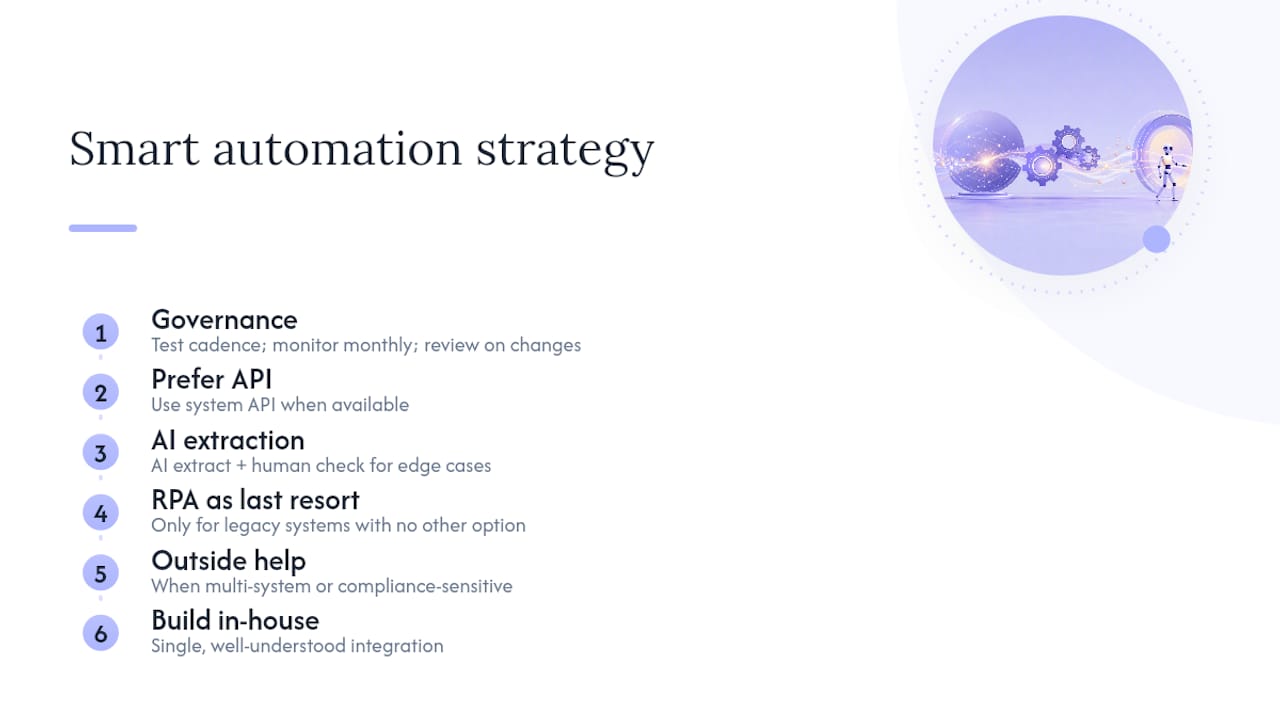
Most companies build the automation they find impressive rather than the one their process actually needs. That’s backwards. If a system has an API, use it. If the data arrives as documents, use AI extraction with a human checking the edge cases. Save RPA for the handful of legacy systems that genuinely leave no other option, and budget for its maintenance honestly.
Governance is not optional decoration. Set a testing cadence, monitor accuracy monthly, and review model performance whenever a source document format changes. Bring in outside help when the process touches multiple systems or compliance-sensitive data. Build in-house when it’s a single, well-understood integration your team already knows how to maintain.
— Shayan Shirvani
How Tech Business Development can help you automate data entry
Tech Business Development builds the exact technology hierarchy this guide describes, starting with API and workflow integrations, layering in AI extraction for document-heavy processes, and reserving RPA only for the legacy systems that truly need it. That order matters because it’s the difference between a fast, low-maintenance win and a fragile script that breaks every time a vendor updates their software.

Setup moves quickly because the team handles the integration work internally rather than farming it out, which keeps timelines short and pricing predictable for small and local businesses. If your team is ready to stop retyping data between systems, book a consultation with Tech Business Development to scope your first automation pilot and get a realistic cost and timeline estimate.
Sources
- Gartner: Data quality
- Eliminate 90% of Manual Data Entry With Automation (2026) (US Tech Automations)
- Automate web form filling and data entry with AI (Automatio)
Recommended